Want to boost your Google rankings? Follow these 12 actionable SEO steps to increase visibility, attract high-quality traffic, and improve conversions. Whether you're running a local business in Canada or managing an e-commerce site, this checklist covers everything from keyword research to technical fixes.
Key Takeaways:
- Understand your audience: Use data to align content with search intent.
- Keyword research: Focus on long-tail keywords for better conversions.
- Content mapping: Tailor content to each stage of the buyer's journey.
- E-E-A-T principles: Build trust with expertise and first-hand experience.
- On-page SEO: Optimize titles, meta descriptions, and internal links.
- Local SEO: Strengthen your presence on Google Business Profile and directories.
- Technical SEO: Fix site speed, mobile issues, and crawl errors.
- Backlinks: Build links from authoritative and relevant sources.
- Tracking and auditing: Monitor performance and conduct regular SEO audits.
By following these steps, you can create a solid SEO foundation and drive long-term results. Start with the basics, stay consistent, and keep refining your strategy.
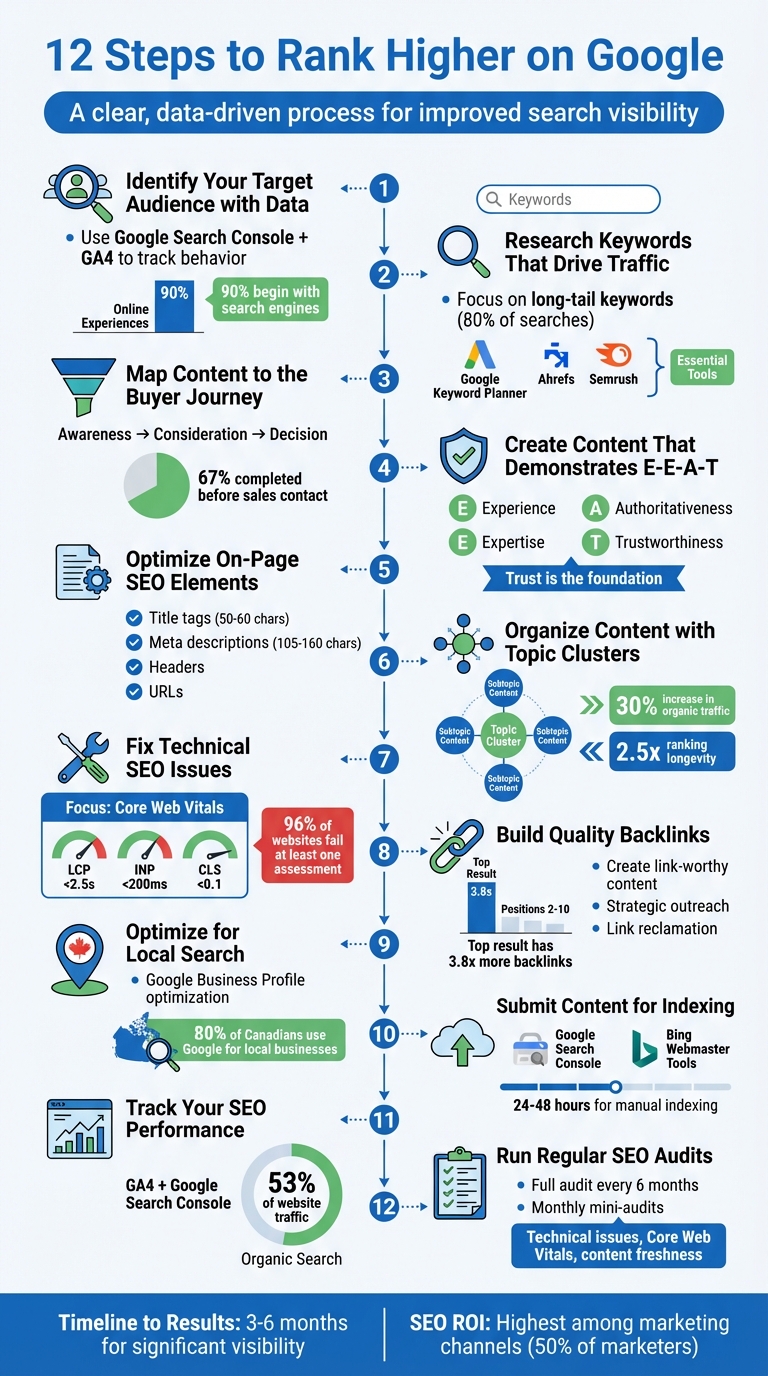
12-Step SEO Checklist to Rank Higher on Google
Complete SEO Guide for Beginners: How to Rank Higher on Google
sbb-itb-d0c5e4d
Step 1: Identify Your Target Audience with Data
Understanding your audience is the foundation of effective SEO. It's not about guessing what people might want - it's about using data to pinpoint how they behave online. With over 90% of online experiences beginning with a search engine, your potential customers are already searching for solutions. The challenge? Making sure your content aligns with their search intent.
Modern SEO shifts the focus from basic demographics (like age or location) to search-focused personas. These personas delve into how people search - the keywords they use, the platforms they trust (think Reddit vs. TikTok), and the triggers behind their queries. As Alex Zagoumenov, Founder of Search Friendly, puts it:
"SEO personas bridge the gap between understanding your customer and understanding how that customer uses search engines."
This means relying on actual behavioural data instead of assumptions. Analytics tools can uncover patterns in user behaviour, helping you create personas that reflect real search intent.
Use Analytics Tools to Track Audience Behaviour
Start by integrating Google Search Console (GSC) with Google Analytics 4 (GA4). Together, these tools provide a complete picture: GSC highlights the keywords driving traffic, while GA4 shows how users behave once they land on your site. For instance, if you’re seeing high traffic but low conversions, your content writing might not be meeting visitor expectations.
Pay attention to metrics like bounce rate and dwell time - Google uses these as signals for rankings. Did you know that top-ranking pages typically load in just 3.5 seconds? If your site is slower, visitors might leave before engaging. Dive into GSC's Queries report to find terms driving traffic, especially those ranking in positions 11–20. These are opportunities for improvement - tweaking content or aligning it better with intent could push these pages into the top 10.
Consider adding AI visibility tools to your mix. Platforms like Semrush's AI Visibility Toolkit can track how your brand appears in AI-driven search engines like ChatGPT and Perplexity. This is increasingly important since only 360 out of every 1,000 Google searches result in clicks to traditional websites. Understanding how AI platforms surface your content can give you an edge.
Armed with this data, you can start building personas that reflect real search behaviours.
Build Personas Based on Search Intent
Using the insights you've gathered, create personas that focus on search intent. Your audience can typically be grouped into four categories:
- Informational: Looking for answers or "how-to" content.
- Navigational: Searching for a specific brand or website.
- Transactional: Ready to make a purchase or hire a service.
- Commercial: Comparing options before making a decision.
Here’s how to build these personas:
- Use tools like GSC and keyword research platforms to map terms to each stage of the buyer journey.
- Survey your customers directly - ask what they searched for when they first encountered their problem.
- Explore platforms like Reddit and Facebook Groups to capture the unfiltered language your audience uses.
- Identify recurring frustrations or triggers (e.g., "customer service is unhelpful") that drive searches. Use this language in your H1 and H2 tags to boost relevance.
It’s also important to differentiate between challenges (long-term issues like tight budgets) and triggers (immediate events like a competitor launching a new product). Triggers often prompt action, so make them a focal point in your content. For businesses in Canada, don’t forget to consider bilingual search behaviours - especially in Quebec, where French-language queries require separate persona mapping.
| Persona Element | Data Source | SEO Application |
|---|---|---|
| Search Goals | Customer Surveys / Interviews | Identifies the key problem the content must address |
| Keywords by Stage | GSC / Keyword Planner / Ahrefs | Maps specific terms to Awareness, Consideration, and Decision stages |
| Preferred Channels | SparkToro / GA4 | Determines whether to focus on blogs, YouTube, or TikTok |
| Search Pain Points | Reddit / Review Sites (e.g., G2) | Reveals user frustrations or confusing jargon |
| Trust Signals | SERP Analysis / Competitor Sites | Highlights what builds user trust (e.g., reviews, credentials) |
Step 2: Research Keywords That Drive Traffic
Once you've gained a deeper understanding of your audience in Step 1, the next step is figuring out the exact search terms they use. This process, known as keyword research, helps you identify terms that can bring in high-quality visitors. Interestingly, only about 20% of searches are for popular, broad terms (often called "fat head" keywords), while the other 80% are more specific, long-tail keywords that often lead to better conversions.
Your focus should be on three categories of keywords:
- Primary keywords: The main term in a cluster with the highest search volume.
- Secondary keywords: Variations or related terms that support the main keyword.
- Long-tail keywords: Detailed, multi-word phrases like “women’s red running shoes size 8” that have lower competition but attract highly targeted traffic.
While long-tail keywords may have fewer searches compared to broad terms like "shoes", they often connect with users who already know what they want, making them easier to rank for and more likely to convert.
Tools to Identify Keywords
Start with free tools like Google Keyword Planner (GKP). You can access it for free by choosing "Expert Mode" and selecting "Create an account without a campaign". Enter up to 10 broad topics to generate thousands of keyword ideas or use the "Start with a website" feature to reverse-engineer a competitor’s strategy.
For more advanced options, tools like Ahrefs and Semrush provide features like "Keywords Explorer" to uncover related terms and questions, and the "Content Gap" tool to spot keywords your competitors rank for but you don’t. These paid tools can help you dig deeper into keyword opportunities and refine your strategy.
Match Keywords to Search Intent
Keyword selection isn’t just about finding terms with high search volume - it’s about understanding why people are searching. As Greg Gifford, VP of Search at Search Lab, explains:
"We're not simply matching keyword to keyword any more. We have to understand how potential customers are searching - and specifically, the intent of their search query."
Each keyword aligns with one of four intent categories:
- Informational: Users want knowledge (e.g., "how to start a blog").
- Navigational: Users are looking for a specific site or page (e.g., "Semrush login").
- Commercial: Users are researching options (e.g., "best SEO tools 2026").
- Transactional: Users are ready to make a purchase (e.g., "buy Ahrefs subscription").
Before targeting a keyword, search it yourself. If the top results are videos or listicles, your content must follow a similar format to match user expectations. A mismatch between search intent and your content can lead to high bounce rates - for instance, someone searching "how to clean shoes" won’t stick around if they land on a product page.
Tools like Ahrefs’ "Parent Topic" feature can help you group keywords by intent, making it easier to decide whether a single page can address multiple queries or if separate pages are needed. Start by focusing on bottom-of-the-funnel (BoFu) keywords, such as “buy [product],” which drive immediate revenue despite their lower search volume.
Find Keywords with Good Search Volume
Search volume shows how often a keyword is searched each month, but it’s only one piece of the puzzle. You also need to consider factors like competition and the overall potential traffic a keyword can bring. Jonathan Berthold, VP of Revenue at Moz, explains:
"Search volume isn't the only guiding light... Prompt tracking is about understanding how your audience thinks, asks questions, and explores problems in their own words."
The goal is to find keywords with decent search volume and manageable competition. In tools like Ahrefs or Semrush, filter for keywords with a Keyword Difficulty (KD) score in the "Easy" range (0–29%) to uncover low-competition opportunities. However, don’t rely solely on these scores - manually review the top-ranking pages to check their relevance and authority.
For commercial value, Google Keyword Planner’s "Top of Page Bid" metric is a helpful indicator - higher bids often signal keywords that lead to sales. Ahrefs also suggests looking at Traffic Potential, which measures the total traffic a page could generate from all the keywords it ranks for, not just one phrase. Finally, target "striking distance" keywords - those where your site already ranks between positions 11–20. These are prime opportunities for quick improvements that can push your content to page one.
| Keyword Type | Volume | Difficulty | Best For |
|---|---|---|---|
| Fat Head | High | High | Brand awareness, established sites |
| Secondary | Moderate | Moderate | Supporting content, topic depth |
| Long-Tail | Low | Low | Conversions, newer sites |
Step 3: Map Content to the Buyer Journey
Once you've completed your keyword research, the next step is to align your content with the buyer's journey. This means using the insights from Step 2 to create content that fits each stage of the buying process. Research shows that 67% of the buyer's journey is completed before a prospect even contacts a sales representative. So, your content needs to address the specific needs of users at every stage to keep them engaged and moving forward.
The buyer journey typically has three main stages:
- Awareness stage: At this point, users are looking for educational resources to better understand their problems. Think blog posts, how-to guides, and explainer content.
- Consideration stage: Here, users are comparing solutions. Content like comparison guides, case studies, and webinars can help them decide which option suits them best.
- Decision stage: This is where users are ready to commit. Product demos, pricing pages, customer testimonials, and location-specific landing pages work well to convert them into customers.
For example, a search query like "why do I need a business website" reflects the Awareness stage, while "web design company Ottawa" indicates the Decision stage.
A powerful example of this strategy in action comes from iWEBAPP Canada's collaboration with AMEQ Academy in November 2025. By developing a content plan that focused on building topical authority with content clusters tailored to the buyer journey, AMEQ Academy achieved incredible results: a 340% increase in organic search traffic, a 520% rise in qualified leads, a 280% boost in conversion rates, and an 89% drop in bounce rate. This success was directly tied to creating content that met user needs at every stage.
To streamline this process, assign one primary page to each buyer intent. This avoids internal competition between your pages and makes it easier to guide users through the funnel. For instance, you could link a "What is CRM" blog post (Awareness) to a "CRM comparison guide" (Consideration) and then to your pricing page (Decision). Thoughtful internal linking like this helps users naturally progress through their journey.
Step 4: Create Content That Demonstrates E-E-A-T
To refine your content strategy, align it with Google's E-E-A-T principles: Experience, Expertise, Authoritativeness, and Trustworthiness. These guidelines are at the heart of Google's Quality Rater Guidelines, which stress that "Trust is the most important member of the E-E-A-T family". Trust serves as the foundation that validates all other elements. In December 2022, Google added a second "E" for Experience, underscoring the importance of firsthand insights over generic material. Let’s break down each pillar to help you craft content that resonates with both users and search engines.
Experience refers to demonstrating direct, hands-on involvement with the topic. For instance, if you’re targeting a Canadian audience, consider sharing original photos of your team winterizing homes in Calgary or recounting a personal fitness journey in Vancouver. Using first-person language like "I tested" or "We tried" can make your content feel more relatable and credible.
Expertise can be highlighted by showcasing your credentials and local knowledge. Include detailed author bios that demonstrate your qualifications and experience. To build authoritativeness, aim for backlinks from reputable sources or endorsements from well-known institutions. A great example is Angi, a home services platform. They reinforce their authority by featuring articles written by seasoned professionals, such as a construction expert with over 30 years of experience who contributed to a piece on shiplap installation costs. This strategy has helped their content perform exceptionally well in search rankings.
Trustworthiness is non-negotiable. You can signal trust by using HTTPS, providing clear contact details (like a local phone number and address), and maintaining accessible Privacy Policy and Terms of Service pages. For Canadian businesses, displaying a local address and adhering to regional standards further strengthens trust. Regularly updating your content and including "Last Updated" dates also ensures your information stays relevant and reliable.
The importance of E-E-A-T becomes even more evident when considering Google’s algorithm updates. Pages lacking strong trust or authority signals are often the first to lose traffic after these updates. As Brian Dean, Founder of Backlinko, puts it:
"E-E-A-T isn't a ranking factor in the way we traditionally think of ranking factors. Instead, think about Google E-E-A-T as a mindset for creating helpful and people-centric content".
For sensitive topics like health, finance, or safety - also known as "Your Money or Your Life" (YMYL) topics - Google holds content to the highest E-E-A-T standards. This is because inaccuracies in these areas can lead to severe consequences. If your content falls under YMYL, it’s crucial to highlight professional qualifications, cite credible Canadian sources such as Statistics Canada, and maintain transparency about your editorial processes.
Step 5: Optimise On-Page SEO Elements
Once you've established E-E-A-T, it's time to fine-tune technical elements to improve relevance and rankings. On-page SEO is all about optimising key components like title tags, meta descriptions, URLs, and internal links to benefit both search engines and users.
Start with keyword placement. Position your primary keyword near the beginning of the title tag. In the body content, include it naturally within the first 100–150 words, then sprinkle it throughout without overdoing it - Google warns that keyword stuffing can make your content appear spammy.
Your URL structure is another factor to consider. Google uses the words in URLs as a minor ranking signal. Descriptive URLs like web3.ca/seo-checklist are easier for users to understand compared to generic ones like web3.ca/page1-2025. Aim for short URLs (3–5 words) and separate words with hyphens, not underscores or spaces. For Canadian audiences, you might include a geotargeting element, such as an /en-ca/ subdirectory.
Header tags help organise your content and make it more accessible. Use one H1 tag per page that includes your primary keyword, and structure your content with H2 and H3 tags that naturally incorporate related terms. This approach not only aids search engines but also improves readability for users.
| Element | Recommended Length | Keyword Placement Best Practice |
|---|---|---|
| Title Tag | 50–60 characters | Place primary keyword at the start; use modifiers |
| Meta Description | 105–160 characters | Include keyword naturally; focus on value/CTA |
| H1 Header | No strict limit | Start with the primary keyword |
| URL Slug | 3–5 words | Use primary keyword; separate words with hyphens |
| Body Content | 300+ words | Mention keyword in the first 100 words; use related terms |
These elements work together to improve your page's performance while providing a better user experience.
Write Titles and Meta Descriptions That Get Clicks
Beyond keyword placement and URL structure, your title and meta description need to attract clicks. Titles serve as the first impression users get of your page. To avoid truncation on desktop and mobile, keep them between 50–60 characters (or under 600 pixels). Research shows that 65–85% of pages ranking on the first page of Google include their target keyword in the title tag.
Adding modifiers like "best", "guide", "checklist", or the current year (e.g., "2026") can help your title stand out and attract long-tail search traffic. Headlines with numbers can perform especially well - titles with numbers get up to 36% more clicks, and odd numbers tend to perform better than even ones. Additionally, titles with positive emotional language often see a 4.1% boost in click-through rates compared to those with negative sentiment.
While meta descriptions don't directly impact rankings, they do influence click-through rates. Keep them concise (105–160 characters) so they display fully on both desktop and mobile devices. Including your target keyword naturally can make your listing more noticeable since Google often bolds these terms in search results. Wrap up your meta description with a clear call-to-action that highlights the value of clicking through.
One thing to keep in mind: Google rewrote about 76% of title tags as of Q1 2025. To reduce the chances of this happening, align your <title> tag closely with your H1 heading and ensure both include your primary keyword. As John Mueller, a Senior Search Analyst at Google, explains:
"title tags help algorithms recognize what is actually on a page."
Add Internal and External Links
Internal and external links play a critical role in improving site structure and credibility. Internal links connect related content, helping users and search engines navigate your site. Link from high-authority pages to high-priority or new content that needs a boost. For a typical article, aim for 3–6 contextual internal links per 1,000 words and 5–10 links for 2,000 words. Studies show that having 45–50 internal links on a page can lead to optimal performance.
Use descriptive, keyword-rich anchor text to make the purpose of the link clear. For example, instead of generic phrases like "read more", use specific terms like "how to research keywords." This approach creates topical clusters, linking pillar content to related subtopics, and reinforces your site's expertise.
External links, meanwhile, add credibility by connecting your content to authoritative sources. For example, linking to trusted sites like Statistics Canada, peer-reviewed studies, or government resources can strengthen your content's reliability. Use the dofollow attribute for most internal links to pass authority, but apply nofollow tags for external links to sites you don't want to endorse.
Regularly audit your internal links to ensure they don't lead to 404 errors, which can frustrate users and waste crawl budget. Also, fix any orphan pages - important pages with no incoming links - to ensure they are easily found and indexed by crawlers.
Step 6: Organize Content with Topic Clusters
To structure your content effectively, use a topic cluster model. Start with a central pillar page that provides a broad overview of a core topic - like "SEO for Canadian Businesses." From there, link to detailed cluster pages that explore specific subtopics, such as "local SEO in Edmonton" or "bilingual keyword research." This setup helps search engines see your site as a hub of expertise, instead of a collection of unrelated posts.
Make sure there’s two-way internal linking between your pillar page and each cluster page. The pillar page should link out to all cluster pages, and each cluster page must link back to the pillar. Use descriptive, keyword-rich anchor text - like "comprehensive SEO audit checklist" - to clearly show how the pages are connected. This creates a closed authority loop, distributing link equity and reinforcing your site's credibility on the topic. Research shows that this approach can increase organic traffic by 30% and extend ranking longevity by 2.5 times.
Real-world examples highlight the effectiveness of this strategy. For instance, UK ecommerce retailer Land of Rugs saw blog page views jump by 119% and generated over C$170,000 in revenue by implementing topic clusters. Similarly, Backlinko’s 57-page "SEO Marketing" cluster ranks for more than 29,000 keywords, attracts over 158,000 monthly visitors, and has earned approximately 165,000 backlinks.
To get started, audit your content using Google Search Console. Identify potential pillar pages and map keywords across the buyer journey to avoid keyword cannibalization. Align your pillar and cluster pages with the stages of the buyer journey to ensure you’re covering the entire funnel. Use keyword-rich anchor text and cross-link related cluster pages to provide more context and improve navigation.
Organizing content into clusters not only boosts your authority but also improves user experience - an essential part of a strong SEO strategy. Search engines now prioritize sites that show expertise across entire topics instead of focusing on isolated keywords. As the HubSpot SEO Research Team explains:
"The future of SEO lies in demonstrating comprehensive knowledge across entire topics, not just individual keywords. Internal linking is the connective tissue that makes this possible."
Step 7: Fix Technical SEO Issues
Once your content and on-page elements are in place, it's time to tackle technical SEO issues that could block your site from reaching its full potential. Even the most well-crafted content won't rank if Google can't crawl, index, or trust your site. Think of technical SEO as the backbone of your strategy - if it's weak, your rankings will hit a ceiling. Consider this: 96% of websites fail at least one Core Web Vitals assessment, and 69% have orphan pages that search engines struggle to find. Fixing these issues is a must before moving on to other SEO enhancements.
Start with Core Web Vitals, which are now critical ranking factors. Google evaluates three main metrics:
- Largest Contentful Paint (LCP): Should load in under 2.5 seconds.
- Interaction to Next Paint (INP): Must respond in under 200 milliseconds.
- Cumulative Layout Shift (CLS): Needs to stay below 0.1.
For example, in November 2025, a client in Huntington Beach partnered with The Clay Media to fix a sluggish 6–9 second mobile load time. By compressing hero images and improving tap target design, they reduced load time to 1.9 seconds, cutting bounce rates by 48% and increasing mobile conversions by 31%. Use tools like PageSpeed Insights to pinpoint pages marked as "Poor" and address specific issues such as preloading critical resources or splitting up long JavaScript tasks.
Next, focus on mobile-first indexing, as Google now ranks your site based on its mobile version. Use Google's Mobile-Friendly Test to identify problems such as small text, cramped tap targets, or content that doesn't fit the screen. One Edmonton-based home-service provider saw their rankings plummet because their mobile site took over six seconds to load due to oversized 2.3MB images and bloated code. Competitors with faster load times (2–3 seconds) outperformed them until these issues were resolved.
Don't overlook your site's crawlability and security. Start by reviewing your robots.txt file to ensure it isn't unintentionally blocking CSS or JavaScript. One dental clinic discovered that an outdated configuration was preventing Google from indexing new treatment pages because it blocked the entire directory where those pages were stored. Also, enforce a 301 redirect from HTTP to HTTPS, as 27% of websites still allow both versions, diluting link equity. Tools like Screaming Frog can help uncover redirect chains and broken links - issues that affect 52% of sites and frustrate users while slowing down search engine crawlers.
Finally, implement structured data using Schema markup to help Google interpret your content and boost your chances of earning rich results. Websites with structured data are 58% more likely to appear in enhanced search features. Regularly update your XML sitemaps through Google Search Console and perform quarterly audits to catch potential problems early. As Digital 6ix aptly states:
"If your technical foundation is broken, no amount of content or backlinks will move the needle. Google can't rank a page it can't crawl, index, or trust".
Step 8: Build Quality Backlinks
Once your site's technical foundation and on-page elements are in good shape, it's time to focus on building quality backlinks. These links are essential for boosting your site's authority and signalling trustworthiness to search engines.
Backlinks remain one of the top three ranking factors in 2026. They help search engines discover new pages, speed up indexing, and transfer "link equity" (authority) from one site to another. To put it into perspective, the top-ranking result on Google typically has 3.8 times more backlinks than results in positions 2 through 10 combined. In the age of AI-driven search, backlinks also play a role in strengthening your brand's relevance. By earning links from reputable sites, you amplify your on-page efforts and gain credibility.
What Makes a Backlink High Quality?
Not all backlinks are created equal. For a link to be considered high quality, it should come from a topically relevant site with real organic traffic - ideally, over 300 visits per month. Additionally, these links should be earned through editorial placements, not tucked away in footers or sidebars.
A growing concept called "co-citation" is also worth noting. Even if your site isn’t linked directly, being mentioned alongside authoritative brands in content can help AI models associate your brand with specific topics. As Backlinko explains:
"In today's search landscape - especially with large language models (LLMs) like ChatGPT and AI Mode - context beats the <href> tag".
How to Build Quality Backlinks
- Create Link-Worthy Content: Invest in resources that naturally attract citations, such as original research, data studies, or interactive tools. These "citation magnets" encourage publishers to reference your content. Brian Dean of Backlinko used this approach by featuring his brand in relevant content, which boosted both visibility and sales.
- The Moving Man Method: Identify outdated resources online and reach out to sites still linking to those pages. Offer your updated content as a replacement. Backlinko famously used this method during SEOMoz's rebranding to Moz, securing links from high-authority domains like .edu sites.
- Strategic Outreach: Guest posting, when done thoughtfully, remains a powerful tool. For example, Daniel Daines-Hutt of Amp My Content used a podcast outreach strategy to appear on 60 podcasts in 90 days, taking his Domain Authority from 0 to 48 in just three months. Focus on contributing valuable articles to high-traffic, relevant sites rather than chasing low-quality blogs. Before pitching, evaluate a site's authority using tools like Semrush, and steer clear of sites that charge for guest posts or have inflated metrics with no real audience.
- Link Reclamation: Use tools like Semrush or Google Alerts to track unlinked mentions of your brand. Reach out to authors and politely request they add a link to your site. This simple tactic has a success rate of 40–70% for converting mentions into backlinks.
Best Practices for Backlink Building
To maintain a natural link profile, aim for 10–30 high-quality links per month if your site is still growing. Avoid overloading with links, as it could appear manipulative. Also, diversify your anchor text. A balanced approach includes:
- 40–60% branded anchors
- 20–30% partial-match anchors
- 1–5% exact-match anchors
Step 9: Optimize for Local Search
Connecting with nearby customers is easier when you focus on local SEO. Over 80% of Canadians use Google Search or Maps to find local businesses. This means your Google Business Profile and location-specific content are critical for standing out against competitors in your area. Done right, local SEO ensures that potential customers choose you over others nearby.
The key to success in local SEO starts with NAP consistency - your business's Name, Address, and Phone number must match everywhere it appears online. This includes your website, Google Business Profile, and Canadian directories like Yellow Pages Canada, 411.ca, and CanadaOne. Tools like BrightLocal or Moz Local can help you identify and fix inconsistencies.
Adding local keywords to your strategy is another important step. Use phrases that combine your services with specific locations, such as "SEO agency in Calgary" or "Vancouver real estate". Long-tail keywords like "winter plumbing inspection Calgary" are especially useful because they target specific search intents and often face less competition. To further boost your local search presence, implement LocalBusiness schema markup. This helps Google verify your location and contact details with greater accuracy.
Optimize Your Google Business Profile
Think of your Google Business Profile (GBP) as your digital storefront. As Vivid Strategy explains:
"Your Google Business Profile is your digital storefront... this profile often determines whether they choose you or your competitor down the street."
Start by claiming and verifying your profile through postcard, phone, or email. Fill out every field, including a description (up to 750 characters), your hours (including holiday schedules), and your service areas. Select one primary category and up to nine secondary categories - your primary category is the most important ranking signal, so choose carefully.
Adding photos is essential. Include clear images of your storefront, team, interior, and completed projects, as profiles with photos get significantly more clicks. Use GBP Posts to share updates, promotions, and events weekly. If your business operates in Quebec or serves customers across Canada, provide information in both English and French to reach a broader audience.
Reviews are crucial. With 83% of consumers reading Google reviews before making decisions, having a system to request and respond to reviews can make a big difference. Be sure to reply to all feedback - positive or negative - within 48 hours. You can also pre-fill the Q&A section with answers to common questions to ensure accurate information.
For an added boost, use a local phone number with an area code that matches your location instead of a toll-free 800 number. This strengthens your local relevance. Additionally, check attributes like "Women-owned", "LGBTQ+ friendly", or "Wheelchair accessible" to appear in filtered searches. Verified profiles receive twice as many clicks as unverified ones, so don’t skip the verification process.
A well-optimized Google Business Profile sets the stage for capturing local traffic through targeted landing pages.
Create Location-Specific Landing Pages
If your business operates in multiple areas across Western Canada, consider creating dedicated landing pages for each region. These pages should focus on local search intent and include region-specific content. Use descriptive URLs that feature the city name, such as example.ca/services/calgary.
Ensure each landing page includes the city name in the page title tag and meta description to strengthen its local relevance. Linking these pages directly from your GBP "Website" field can also enhance your local authority. This strategy helps you compete effectively in specific markets and ensures potential customers can easily find your services.
Once your local SEO is in place, you'll be ready to focus on making your content even easier for search engines to discover and index.
Step 10: Submit Content for Indexing
After making all your technical SEO updates, it’s time to ensure Google indexes your new content quickly. Without indexing - essentially Google storing your content in its database - your pages won’t show up in search results. While search engine bots naturally crawl the web through links, this process can take anywhere from a few days to several weeks. For time-sensitive content, like a seasonal sale or breaking news, waiting for natural crawling isn’t ideal.
Manual submission puts you in control of when Google discovers your content. Google Search Console (GSC) provides two main ways to submit content: the URL Inspection tool for individual pages and sitemap submission for multiple pages. For a single page, paste the URL into GSC’s top search bar, and if it’s not already indexed, click “Request Indexing”. This usually prompts a crawl within 24 to 48 hours. For larger volumes of content, submit your sitemap via GSC, which allows Google to index multiple pages at once. Many platforms, like WordPress, make this easy by generating sitemaps automatically through plugins like Yoast SEO or Rank Math.
Don’t stop with Google - submit your sitemap to Bing Webmaster Tools as well. Bing powers Yahoo’s search results, so this step helps you cover both platforms at once. The process is straightforward: log in, go to “Sitemaps” in the sidebar, and click “Submit sitemap.” While Google dominates with over 90% of the global search market, Bing still drives a notable amount of traffic in Canada. Expanding your submission ensures broader visibility.
Before submitting for indexing, it’s wise to check for technical issues using the URL Inspection tool. Common problems like "noindex" tags or incorrect robots.txt files can block your content from being indexed. To see if a page is already indexed, search site:yourdomain.ca/page-url directly in Google. If you notice consistent indexing problems, Google’s John Mueller advises:
"If you have a smaller site and you're seeing a significant part of your pages are not being indexed, then I would take a step back and try to reconsider the overall quality of the website".
Speed is crucial, especially in competitive niches. Getting your content indexed even 48 hours before your competitors can make the difference between ranking on page one or being buried on page two. Once your content is indexed, the next step is to track how it performs. Move on to Step 11 to monitor your SEO progress.
Step 11: Track Your SEO Performance
Keeping tabs on your SEO performance is crucial - after all, organic search accounts for 53% of website traffic.
Start with Google Analytics 4 (GA4) and Google Search Console (GSC). These free tools form the backbone of your tracking efforts. GA4 helps you understand visitor behaviour, offering insights into metrics like session duration, bounce rate, and conversions. On the other hand, GSC provides a window into how Google views your site, delivering data on search queries, click-through rates (CTR), and indexing issues. Together, they let you see which search queries bring users to specific landing pages and whether your content aligns with user intent. For instance, if a page ranks well but shows a high bounce rate, it might mean the content isn’t meeting user expectations.
For more detailed tracking, consider paid tools like Ahrefs (around $100/month). GSC gives you impressions and clicks, but Ahrefs shows your exact keyword positions and compares your performance to competitors. Pay extra attention to keywords ranking between positions 4 and 10 - these are often low-hanging fruit. Small adjustments to these pages can push them into the top three spots, which capture 54% of all clicks.
To stay on top of your SEO game:
- Check for ranking drops weekly.
- Monitor traffic and conversions monthly.
- Conduct more in-depth strategic audits quarterly.
It’s also helpful to segment your traffic into branded and non-branded searches. This separation gives you a clearer picture of your organic growth. Track conversions too - organic traffic typically converts at a rate of 2% to 5%. Use GA4’s assisted conversion reports to learn how SEO contributes to purchases, even when it’s not the final interaction.
"You can't manage what you don't measure."
If GSC shows high impressions but low CTR, consider tweaking your titles and meta descriptions. A drop in rankings paired with steady traffic might just be normal SERP fluctuations. But if you see both rankings and traffic take a nosedive, check for technical issues like accidental "noindex" tags or blocked pages in your robots.txt file. These ongoing checks will set the stage for the SEO audits covered in Step 12.
Step 12: Run Regular SEO Audits
Think of an SEO audit as a routine check-up for your website's health. It’s not something to put off until you notice a dip in traffic. Performing regular audits is key to maintaining your rankings. Ideally, you should conduct a full technical SEO audit every six months, alongside smaller monthly audits to catch issues like 404 errors or sitemap glitches before they become bigger problems.
"An SEO audit isn't a one-time thing. The best teams run a version of this checklist every 6 months, because websites change, Google updates, and new competitors appear." - Digital6ix
Start by examining your website's technical foundation - the behind-the-scenes structure that keeps everything running smoothly. Tools like Screaming Frog can help you pinpoint technical issues, while Google Search Console is invaluable for uncovering indexing errors. Address these problems first, as pages that can’t be crawled or indexed won’t appear in search results.
Next, turn your attention to on-page elements. Check that title tags are between 50–60 characters and meta descriptions fall within 120–155 characters. Look for thin content (anything under 300 words) and outdated information, especially on pages that haven’t been updated in over a year. Use performance metrics, such as your AI Visibility Score, to track how your brand is appearing in AI-driven search results. With 61% of CMOs admitting their SEO strategies haven’t adapted to AI search, staying ahead in this area can give you a competitive edge.
Don’t forget to audit Core Web Vitals, as these directly impact user experience and rankings. Pages that meet these standards see a 24% higher click-through rate. Aim for the following benchmarks:
- Largest Contentful Paint (LCP): Under 2.5 seconds
- Interaction to Next Paint (INP): Under 200 milliseconds
- Cumulative Layout Shift (CLS): Below 0.1
Test on real mobile devices to spot issues like poorly sized tap targets or hard-to-read fonts. These regular audits help ensure your site stays competitive, ready for the challenges ahead, and aligned with modern SEO expectations.
Conclusion
SEO isn’t about quick fixes - it’s about creating a website that earns trust from search engines and delivers real value to users. This checklist offers a step-by-step guide to help you build a strong, lasting search presence.
Here’s why it matters: nearly 50% of marketers say SEO provides the highest ROI, and organic search drives 53% of website traffic. While some technical tweaks and on-page updates can show results in a few weeks, achieving significant visibility and traffic growth typically takes three to six months of steady effort.
Start with the basics: measurement, technical optimization, and keyword research. From there, focus on creating content clusters, enhancing local signals, and building authority. Regular maintenance is key - conduct a full technical SEO audit every three to six months, and schedule monthly check-ins to fix broken links or address crawl issues before they hurt your rankings. By following this structured approach, your SEO efforts will build momentum and deliver long-term results.
FAQs
Which 3 SEO steps should I do first?
- Conduct Keyword Research
Start by identifying the terms your audience is actively searching for. This helps you align your content with their needs and search intent, ensuring you're creating content they actually want to find. - Fix Technical Site Health
Address any technical issues that could affect your site's performance. This includes improving page loading speed and resolving crawl errors, which can prevent search engines from properly indexing your site. - Optimize On-Page Elements
Fine-tune elements like titles, meta descriptions, headers, and content. Make sure they're relevant, engaging, and include the keywords your audience is searching for.
These steps lay the groundwork for improving your site's visibility and driving organic traffic.
How long until SEO results show in Canada?
SEO efforts in Canada typically start showing results within 3 to 6 months. However, reaching more consistent and higher rankings often requires 6 to 12 months or more. The timeline varies based on several factors, including the level of competition, the quality of the website, and the strategies being used.
What tools do I need for this checklist?
To tackle this SEO checklist effectively, you'll need a range of tools to cover various aspects of optimisation. Start with Google Analytics to monitor your website traffic and user behaviour. Pair it with Google Search Console to keep tabs on your site's health and performance. For local SEO, Google My Business is a must-have.
Expand your toolkit with keyword research platforms and site audit tools like Semrush or Ahrefs. These help you uncover keyword opportunities and identify technical issues. Don't forget SEO plugins like Yoast, which simplify on-page SEO efforts. For more advanced tasks, consider tools that specialise in backlink analysis and content optimisation. Together, these resources will support your technical, on-page, and off-page SEO strategies.
