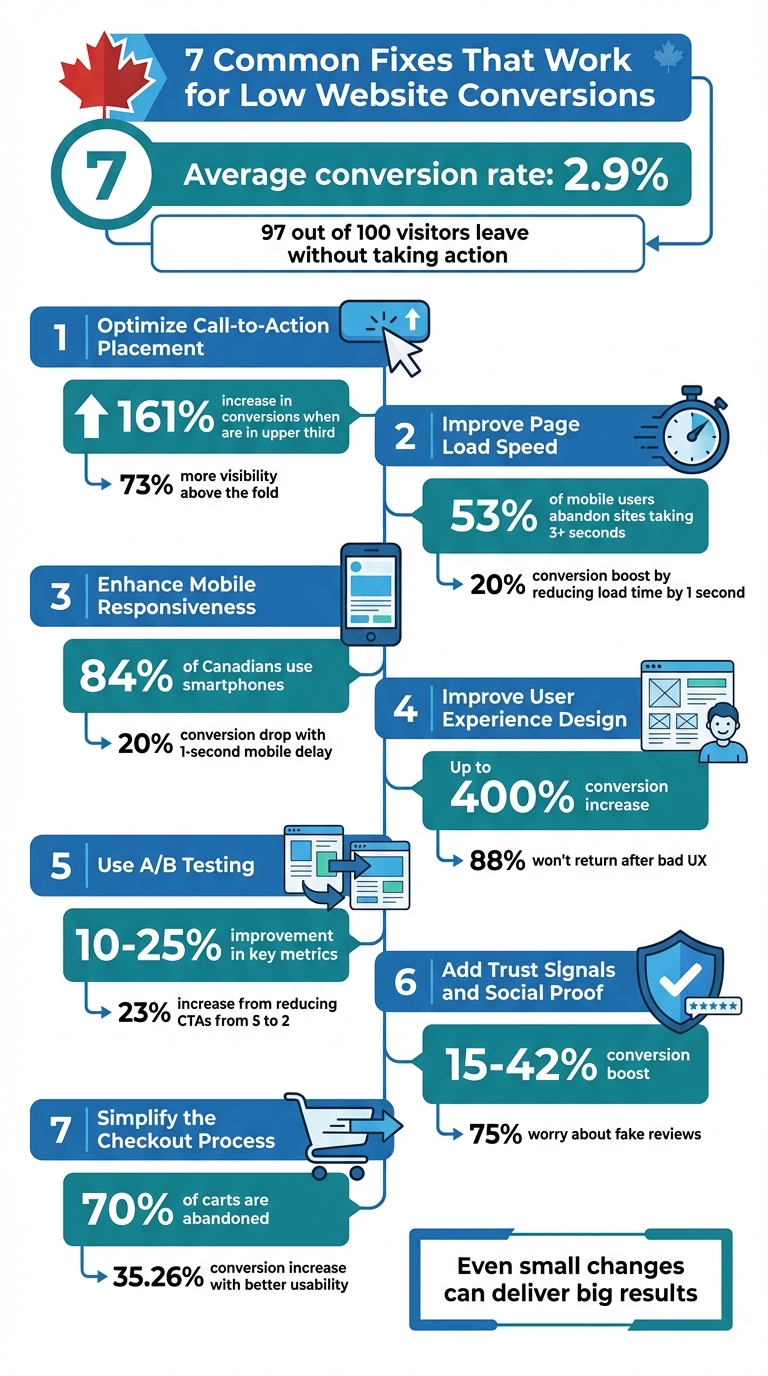
If your website is getting traffic but not converting, you're losing potential revenue. The average conversion rate is just 2.9%, meaning 97 out of 100 visitors leave without taking action. For example, dropping from a 3% to 2% conversion rate could cost an e-commerce site with 100,000 monthly visitors and a CA$50 average order value CA$50,000 per month. Fixing conversion issues can directly improve sales without needing more traffic.
Here are 7 practical fixes to improve conversion rates:
- Optimize Call-to-Action Placement: Make CTAs visible, strategically positioned, and easy to click.
- Improve Page Load Speed: Faster sites reduce bounce rates and increase sales.
- Enhance Mobile Responsiveness: Ensure your site works seamlessly on smartphones.
- Improve User Experience Design: Simplify navigation and make information easy to find.
- Use A/B Testing: Test changes to see what works best for your audience.
- Add Trust Signals and Social Proof: Build credibility with reviews, badges, and real photos.
- Simplify the Checkout Process: Remove friction by reducing form fields and enabling guest checkout.
Even small changes, like speeding up load times or tweaking CTAs, can deliver big results. For Canadian businesses, focusing on mobile usability, transparent pricing, and trust-building elements is especially important. Whether you're in Toronto or Windsor, these fixes help convert traffic into revenue.
7 Proven Fixes to Improve Website Conversion Rates
15 Conversion Rate Optimization Tips That Will 2x Your Sales Overnight
sbb-itb-d0c5e4d
1. Optimize Call-to-Action Placement
Your call-to-action (CTA) button might be hiding in plain sight. When CTAs don’t stand out visually or are placed where users aren’t likely to notice them, they can fall victim to "Button Blindness". Visitors skim your page, engage with your content, and then leave - completely missing the action you want them to take. The solution? Thoughtful placement that aligns with how people naturally navigate web pages.
Impact on Conversion Rates
The statistics are hard to ignore: 70% of small business websites don’t have a CTA on their homepage, and even 53% of Fortune 500 companies fail to follow basic CTA principles. But when CTAs are positioned strategically, the results can be impressive. For example, buttons located in the upper third of a page receive 73% more visibility and can increase conversions by 161%. One e-commerce company saw a 23% spike in conversions simply by reducing their homepage CTAs from five to two. The takeaway? Simplifying and strategically placing CTAs can lead to better engagement and higher conversion rates.
Ease of Implementation
You don’t need a complete website overhaul to fix your CTA placement. Start with the Gutenberg Principle, which shows that users scan pages in a "Z" pattern - from the top-left to the bottom-right - and naturally pause in the "Terminal Area" after reading content. Place your primary CTA in this zone, ideally right after your value proposition. For mobile users, ensure CTAs are within thumb reach and at least 48×48 pixels in size for easy tapping. Use contrasting colours - like bright orange on a white background - to make your buttons stand out, and replace vague phrases like "Submit" with more engaging, action-oriented text such as "Get My Free Quote".
Cost-Effectiveness
This adjustment is simple, affordable, and delivers a solid return on investment. You don’t need pricey software - tools like Hotjar can show you where users focus their attention, and basic A/B testing can help refine your CTA placement. Research backs the results: CTAs placed above the fold see a 44% higher click-through rate compared to those further down the page. Apply Fitts’s Law, which states that larger, closer buttons are easier to click. Stick to one primary CTA per section to avoid overwhelming users, and make secondary options (like "Sign In") less prominent by using ghost buttons or text links.
Relevance to Canadian Businesses
For businesses in competitive cities like Toronto, trust-building elements - such as testimonials, certifications, or client logos - placed near your CTA can help overcome user hesitation. Meanwhile, in smaller communities like Windsor, where reputation is king, clear contact details and mobile-friendly CTAs are essential for converting local searches into sales. With mobile devices projected to account for 63% of all e-commerce sales by 2028, Canadian businesses must ensure their CTAs work seamlessly on smartphones. Test your buttons on real mobile devices under various lighting conditions to confirm they’re both visible and easy to use. From there, you can focus on improving your site’s performance with faster load times.
2. Improve Page Load Speed
A slow website isn’t just annoying for visitors - it can seriously hurt your bottom line. When pages take too long to load, people leave. The stats don’t lie: 53% of mobile users will abandon a site if it takes longer than three seconds to load. Even a delay of just 100 milliseconds can lower conversion rates by 7%. For a mid-sized e-commerce business with an average order value of CA$60 and 5,000 daily visitors, a one-second delay could mean losing CA$9,000 a day.
Impact on Conversion Rates
Speed directly affects how much your site earns. Research shows that shaving a single second off load times can boost conversions by as much as 20%. Even a small improvement - just 0.1 seconds - can encourage shoppers to spend nearly 10% more. On the flip side, if load times increase from 1 to 3 seconds, the bounce rate jumps by 32%. Stretch that to 5 seconds, and 90% of visitors will leave.
Real-world examples show how impactful this can be. Transformer Table sped up their site by 67%, which doubled their conversion rate and helped them grow to over CA$100 million in annual sales. Molekule saw a 75% increase in device conversions after improving their load times. These numbers make it clear: speed isn’t just a technical concern - it’s a business priority.
Ease of Implementation
Improving page speed doesn’t have to be complicated. Start with image compression, as images often make up 50% to 75% of a page’s weight. Tools like TinyPNG or Squoosh can shrink file sizes without reducing quality. Switching to WebP format cuts image sizes by another 30%. You can also enable lazy loading, so images only load when users scroll to them, and review third-party apps - having more than 20 plugins can slow your site significantly. For a more detailed approach, tools like Google PageSpeed Insights and GTmetrix can help you identify specific issues.
Cost-Effectiveness
Investing in speed optimization offers excellent returns. Diana Harbour, owner of Red Dress Boutique, managed to save about CA$100,000 annually by streamlining her hosting and CDN services. Many fixes, like using free compression tools or enabling browser caching, cost nothing beyond the initial setup. For businesses in Canada, using a Content Delivery Network (CDN) with servers located domestically can reduce latency while staying compliant with data sovereignty laws. Platforms like the Web3 Framework also come with built-in tools to simplify speed optimization, eliminating the need for ongoing technical work.
Relevance to Canadian Businesses
For Canadian websites, speed optimization is even more critical due to the country’s vast geography. CDNs ensure faster load times by serving content from servers closest to your visitors - whether they’re in Vancouver or Halifax. Mobile optimization is just as important, with over 60% of local searches happening on mobile devices. If your site includes bilingual content, make sure it doesn’t overload your code.
Focusing on Core Web Vitals is another key step. For example, aim for a Largest Contentful Paint time of under 2.5 seconds and an Interaction to Next Paint time under 200 milliseconds. Sites ranking on Google’s front page typically load in 1.65 seconds or less. In competitive markets like Toronto and Calgary, having a fast-loading site isn’t optional - it’s essential. Once speed is optimized, prioritizing mobile responsiveness should be your next move.
3. Enhance Mobile Responsiveness
A poorly responsive mobile site can seriously hurt your conversions. With 84% of Canadians using smartphones and 95.2% connected to the internet, mobile traffic dominates. Google’s shift to mobile-first indexing means your site is ranked based on its mobile version, not the desktop one. This makes mobile usability a critical part of your site’s performance and overall user experience. A clunky mobile interface doesn’t just irritate visitors - it can tank your search rankings and send potential customers elsewhere.
Impact on Conversion Rates
Mobile responsiveness has a direct impact on whether visitors stick around or leave. A one-second delay in mobile page load time can slash conversion rates by up to 20%. Over half of users will abandon a site that takes more than three seconds to load. On the flip side, sites that load in under one second are 2.5 times more likely to convert than those taking five seconds. Ian Cantle, President of Outsourced Marketing Inc., sums it up perfectly:
"Most local business websites are stuck in the past: outdated templates, slow loading times, forms that don't work on mobile... Visitors are showing up. But they're leaving."
Frustrations like tiny buttons, horizontal scrolling, or needing to zoom to read text drive users away. Considering 60% of local business searches in Canada happen on mobile, fixing these issues is essential to staying competitive.
Ease of Implementation
Start with simple fixes: make interactive elements at least 48 pixels wide and position key calls-to-action (CTAs) where thumbs naturally rest. Use a hamburger menu for cleaner navigation and keep forms short - single-column layouts with auto-fill options work best. Optimizing images and using lazy loading can also boost mobile performance. Tools like Google PageSpeed Insights and GTmetrix can pinpoint specific problems. If you’re using the Web3 Framework, many of these optimizations are already built in, reducing the technical workload.
Cost-Effectiveness
Responsive design is a smarter investment than maintaining separate mobile and desktop sites since you only need to update one version. Many improvements - like compressing images, removing unnecessary plugins, or enabling browser caching - require minimal upfront costs. Adding one-click payment options such as Apple Pay or Google Pay can significantly boost mobile checkout conversions, with rates increasing by 1.91 times compared to standard checkouts. Even shaving half a second off your load time can yield measurable conversion gains.
Relevance to Canadian Businesses
Canada’s vast geography makes mobile optimization even more critical. Whether your customers are in Toronto, Saskatoon, or Windsor, they expect fast, seamless mobile experiences. In urban centres like Toronto, users demand app-like functionality and will quickly abandon clunky sites. In smaller communities, a smooth mobile experience can help drive local foot traffic through search. With smartphone use growing across all demographics - including over half of Canadian seniors - ignoring mobile optimization means missing out on a massive audience. Prioritizing mobile responsiveness sets the stage for improving other aspects of your user experience design.
4. Improve User Experience Design
After addressing CTA placement, page speed, and mobile responsiveness, the next step is refining your user experience (UX) design. UX design plays a huge role in determining whether visitors stay and convert - or leave frustrated. Consider this: 94% of users distrust websites with outdated designs or poor structure, and 88% of online shoppers won’t return after a single frustrating experience. If visitors have to wonder, "Is this clickable?" or struggle to find what they need, they’re likely to leave before even considering your products. Poor UX doesn’t just irritate users - it’s responsible for an estimated 35% of lost sales.
Impact on Conversion Rates
Good UX design can make a massive difference, potentially increasing conversions by up to 400%. Take this example: in late 2025, a wellness brand partnered with Design Sphere to revamp its homepage and simplify navigation (cutting menu items from nine to four). Within just 60 days, they saw a 182% increase in add-to-cart rates and a 44% boost in revenue per visitor. Similarly, Danish fashion brand Rains used heatmaps and session recordings to pinpoint pain points in their user journey. After running A/B tests to address these issues, they achieved a 10% rise in conversions.
Françoise Sonnet, Senior Business Advisor at BDC Advisory Services, sums it up perfectly:
"The better the UX design is, the higher your conversion rate is going to be and the more brand loyalty you will build."
Ease of Implementation
Improving UX doesn’t have to be overwhelming. Start with quick, impactful changes like tweaking CTA text or updating headlines. Follow the 3-click rule (users should find any information within three clicks) and the 5-second rule (your value proposition should be clear within five seconds of landing). Replace vague labels like “Solutions” with more specific ones, such as “Small Business Tools,” to improve clarity. Keep your main menu concise - seven items or fewer - and use clear, descriptive labels. Also, always offer a guest checkout option; forcing account creation is one of the top reasons for cart abandonment. Pairing these changes with faster load times and optimized CTAs creates a smoother, more effective conversion funnel.
Cost-Effectiveness
Investing in UX early can save money in the long run by reducing the need for redesigns and cutting down on support inquiries. Many impactful improvements are surprisingly affordable. For instance, compressing images to WebP format, simplifying form fields, and adding customer testimonials are low-cost fixes with big results. In November 2025, Databending helped Pelee Wings, a nature store in Kingsville, Ontario, improve their site by simplifying navigation and replacing technical jargon with easy-to-understand categories and visuals. The result? A noticeable increase in click-through rates to product pages. Even something as simple as adding testimonials to a landing page can boost conversions by 34%.
Relevance to Canadian Businesses
Whether you’re targeting customers in Toronto or Windsor, UX expectations are critical. In competitive markets like Toronto, users expect fast, seamless, app-like mobile experiences; clunky websites won’t cut it. In smaller communities like Windsor, building trust often hinges on a strong local reputation and familiarity. With Google’s mobile-first indexing now the norm, your site’s mobile experience directly impacts its search ranking. For Canadian SMEs competing on a global scale, great UX design can help level the playing field, making it easier to stand out while building the loyalty that keeps customers returning.
5. Use A/B Testing
Once you've polished your UX design, it's time to validate those changes with A/B testing (also known as split testing). This approach lets you compare two versions of a digital element to see which one performs better based on actual user behaviour. Instead of guessing whether a red button or a blue button works best, you can test both and let the data guide your decisions. It's a straightforward way to boost revenue without increasing your ad spend. A/B testing builds on your UX improvements by offering concrete, data-backed insights for every tweak you make.
Impact on Conversion Rates
A/B testing often delivers measurable improvements, with gains ranging from 10% to 25% in key metrics like click-through rates and sales conversions. For instance, one e-commerce company reduced their homepage CTAs from five to two, resulting in a 23% increase in conversion rates. Zalora, an online retailer, improved checkout rates by 12.3% simply by refining how they displayed product images. Meanwhile, Xerox saw a 60% boost in conversion rates for returning visitors by testing different discount strategies. Peep Laja, the founder of CXL, emphasizes the importance of preparation in A/B testing:
"In my opinion, it's 80% about the research and only 20% about testing. Conversion research will help you determine what to test to begin with".
Ease of Implementation
A/B testing is surprisingly accessible, both in terms of cost and technical know-how. Tools like OptiMonk start at just $30/month, while Shogun offers plans from $40/month after a free trial. The key to success is testing one variable at a time - such as a headline, CTA button, or form length - so you can clearly identify what drives the change. Start with a simple hypothesis: "If we change [X], then [Y] will happen because [reason]". To get reliable results, run your tests for two to four weeks, allowing for fluctuations in traffic across different days. If your site doesn’t attract enough traffic for A/B testing, consider qualitative methods like session recordings or user interviews, which often deliver better insights for smaller websites.
Cost-Effectiveness
Small adjustments, such as tweaking CTA text or headlines, can lead to big results without breaking the bank. Even mid-range tools like Intelligems or Unbounce are priced around $100/month, making them a viable option for smaller businesses. The real advantage of A/B testing lies in preventing costly missteps. Shopify puts it perfectly:
"There's no such thing as a failed test. The entire point of good science is to find out what's not true and what doesn't work".
By testing before committing to major overhauls, you can save thousands of dollars while focusing your efforts on changes that actually deliver results.
Relevance to Canadian Businesses
For businesses in Canada, A/B testing is an effective way to account for regional differences in consumer behaviour. For example, shoppers in Toronto often expect smooth, app-like mobile experiences and rely heavily on social proof to make decisions. In contrast, Windsor consumers may place greater value on local reputation and mobile-to-store navigation. A great example comes from Pelee Wings, a nature store in Kingsville, Ontario. In 2025, they worked with Databending to address high bounce rates. By running A/B tests on their navigation structure, they discovered that technical jargon was confusing customers. Simplifying their categories and adding visual cues led to a noticeable improvement in click-through rates to product pages.
Whether you're testing discount formats (e.g., $25 off vs. 25% off) or optimizing for mobile users, A/B testing helps you fine-tune your approach to suit your audience. This iterative process pairs perfectly with earlier fixes like UX design improvements, ensuring every change you make drives better results.
6. Add Trust Signals and Social Proof
Building trust is crucial for overcoming the hesitation that often blocks conversions. Studies show that only 50% of consumers trust the brands they interact with, while 75% worry about fake reviews. This scepticism means relying solely on Google Reviews won’t cut it. Instead, incorporating trust signals - like security badges, real team photos, and clear contact information - can act as a reassuring handshake, showing visitors their data is secure.
Impact on Conversion Rates
The data is clear: websites that prominently feature trust signals see conversion rate boosts ranging from 15% to 42%. When businesses implement a multi-layered trust system, those gains can climb to 35%–65%. For example, in 2025, a Canadian cleaning company collaborated with digital marketer Jordan Stevens to address low conversions. They realized visitors were uneasy about liability, so they added a simple line - “insured and bonded” - above the fold. This no-cost tweak nearly doubled their conversion rate from 5.2% to 10.1%. Similarly, professional service providers have reported a 40%–60% jump in consultation requests, while home service contractors have seen quote inquiries rise by 50%–70% when trust signals are systematically applied. These results show how even small changes can lead to significant improvements.
Ease of Implementation
Establishing trust doesn’t mean a complete website redesign. Start with the basics: display your Canadian business registration number, BBB accreditation, and any relevant provincial licences. Include a physical business address (avoid P.O. boxes) and a local phone number on your contact page. Replace generic stock images with real photos of your team and office to humanize your brand and increase form submissions. To enhance security, get a free SSL certificate from Let’s Encrypt and display security badges and trusted payment logos (like Visa, Mastercard, and PayPal) on checkout pages. Additionally, tools like Loox, Fera, or Trustpilot can help automate verified review collection and display, often at no cost for basic plans. These simple updates require minimal effort but can make a big impact.
Cost-Effectiveness
Most trust-building measures are either free or very affordable. For instance, SSL certificates from Let’s Encrypt cost nothing. Adding a short line like “insured and bonded” or highlighting years in business (if it’s three or more) also comes at no cost. Even social proof tools often offer free trials or low-cost plans. As Ana Gotter from Shopify Canada aptly puts it:
"A happy customer can outsell even the most compelling copy".
By adding trust signals, you not only boost conversions but also build long-term credibility, as satisfied customers share their positive experiences.
Relevance to Canadian Businesses
Canadian consumers have distinct expectations. They value humility over self-promotion, community engagement, and a commitment to environmental responsibility. Regional preferences also play a role: Ontario and Quebec shoppers focus on regulatory compliance and professional credentials, Western Canadians prioritize practical outcomes, and Atlantic Canadians appreciate strong community connections. For businesses near Quebec, offering bilingual (French) accessibility is a key trust signal. Highlighting PIPEDA compliance to address privacy concerns and using “Verified Buyer” labels to showcase genuine reviews further strengthens local trust.
7. Simplify the Checkout Process
After addressing site speed and user experience, simplifying the checkout process becomes a key step in improving conversions. A complicated checkout experience can quickly drive customers away. In fact, 70% of online shopping carts are abandoned, with 17%–18% of shoppers leaving due to lengthy or confusing processes . Common culprits include unexpected fees, mandatory account creation, and excessive form fields. The upside? Streamlining your checkout process can lead to immediate and measurable improvements without requiring a full website redesign.
Impact on Conversion Rates
The data is clear: improving checkout usability can increase conversion rates by 35.26% . For example, a Canadian business generating CA$100,000 monthly could reduce cart abandonment from 70% to 50%, potentially adding over CA$66,000 in monthly revenue. Real-world examples back this up. In August 2023, Dreamland Jewelry's Marketing Director Daniel Bari reported a 37% increase in conversions simply by offering free shipping on all orders. Similarly, Muddy Bites co-founder Jarod Steffes shared in July 2025 that implementing a one‑click checkout system drove 1,167% year-over-year growth. Even smaller changes can make a difference: in October 2025, scent diffuser company Pura saw a 15% improvement in checkout conversions after adopting a simplified, unified checkout process.
Ease of Implementation
Many checkout optimizations are easy to implement and deliver results quickly. Start by enabling guest checkout, as requiring account creation deters 24%–34% of shoppers . John Cheng, Founder and CEO of Baotris, highlights the importance of this step:
"With ecommerce platforms becoming more and more popular, you don't want to discourage one‑time shoppers. A lot of people may see the process of creating an account as an obstacle."
Next, reduce the number of form fields to 6–8 and use address autocomplete tools (like Google’s API) to speed up the process and reduce mobile errors by 20% . Adding accelerated payment options such as Shop Pay, Apple Pay, or Google Pay can also boost conversion rates by up to 50% compared to traditional checkouts . These simple updates can lead to substantial growth without breaking the bank.
Cost-Effectiveness
Improving checkout is a cost-efficient way to recover lost sales compared to investing in new traffic. Many tools are either free or low-cost. For example, Shopify Inbox offers real-time customer chat, Shopify Self‑Serve Returns automates return management, and the Shop Promise badge displays delivery dates - all at no additional cost . The benefits are undeniable: 90% of customers report that a smooth checkout experience makes them more likely to purchase from the same brand again.
Relevance to Canadian Businesses
Canadian shoppers value transparency and convenience. Display all costs upfront - including shipping, taxes, and duties - to avoid the 48% cart abandonment rate caused by unexpected fees. Businesses in cities like Vancouver and Victoria can build trust by offering familiar payment methods like PayPal and tailoring promotions to local preferences. For those selling internationally, tools like Shopify Managed Markets allow businesses to support 136 currencies and 20 languages, adapting to the shopper’s location. In Quebec, bilingual checkout options are especially important for connecting with local customers.
Web3 Service Comparison
Web3 offers three tailored service packages aimed at boosting conversions through exceptional design, speed, and digital marketing strategies.
The Basic Website Package starts at CA$3,500 and includes a custom, responsive design, SEO optimization built on the proprietary Web3 Framework, and SSD-based hosting designed for high performance. This is a great choice for small businesses aiming to establish a professional online presence. With over 60% of local searches coming from mobile devices, having a site that loads in under 2 seconds can significantly reduce user drop-off rates.
For organizations looking to stand out in competitive markets, the Custom Website Package starts at CA$20,000+. This option includes bespoke UI/UX design and integrated SEO from the ground up. Web3’s in-house developers, each with an average of 10 years’ experience, craft sites from scratch to ensure unmatched speed and reliability. The results speak for themselves: Guide Dogs Queensland saw its eCommerce revenue quadruple in less than six months, while Kingston Fox Lawyers tripled their Google Ads conversions without increasing their ad spend.
The Google Ads Maintenance plan, starting at CA$400 per month, is designed to drive qualified traffic to your site. Certified experts manage keyword strategies, optimize Quality Scores to lower cost-per-click, and implement retargeting campaigns for the 98% of visitors who don’t convert on their first visit. This service ensures your site stays visible and effective in attracting potential customers.
Conclusion
The seven practical fixes we've discussed show how targeted tweaks can directly improve revenue. These changes tackle the common issues that drive visitors away - like slow page speeds, vague calls-to-action, cumbersome checkout processes, and missing trust signals. It’s a simple truth: many Canadian businesses don’t need more traffic; they need websites that better convert the traffic they’re already paying to attract. As Ian Cantle, President of Outsourced Marketing Inc., succinctly states:
"Most businesses don't need more traffic. They need a site that doesn't leak the traffic they're already getting".
Instead of focusing on increasing visitor numbers, the priority should be on converting the existing traffic more effectively. With the average website converting just 2.9% of visitors, even minor adjustments can lead to noticeable results. For instance, improving page speed by just one second or simplifying checkout processes can significantly boost conversion rates. Even something as simple as adding five customer reviews can increase conversions by 270%. These small, proven steps can directly impact revenue without requiring additional marketing spend.
For Canadian businesses, the numbers highlight the need to optimize every interaction on their websites. Your website is essentially your digital first impression. Whether you're competing in Toronto's bustling market or building trust in smaller communities like Windsor, visitors judge your business instantly based on factors like speed, clarity, and trustworthiness. With mobile users now making up over 64% of all traffic, they expect a smooth, app-like experience, while desktop users demand polished, professional design and clear navigation.
To make the biggest impact quickly, start with the easiest wins: review your checkout process, fine-tune your mobile site, and sharpen your headlines and calls-to-action. Tools like Microsoft Clarity can help you watch real user sessions to pinpoint where visitors are getting stuck. Adopt practices like the three-click rule to ensure users can find what they’re looking for without frustration. These low-cost changes can deliver immediate results.
These initial fixes set the stage for more tailored solutions that fit your business’s specific needs. Web3 offers packages designed to implement these strategies, from the CA$3,000 Basic Website Package to fully customized solutions. Combined with Google Ads Maintenance starting at CA$400 per month, you can ensure your site not only attracts qualified traffic but also converts it. Every visitor should count.
FAQs
Which fix should I tackle first for the fastest conversion lift?
Positioning your call-to-action (CTA) effectively can make a world of difference. Place CTAs where they grab attention right away - whether it’s above the fold, at the end of compelling content, or alongside key information. Use clear, action-oriented language that motivates users to act. A small tweak like this can significantly increase conversions by making the desired action impossible to miss.
How much traffic do I need for reliable A/B test results?
For dependable A/B test outcomes, try to have at least 1,000 visitors per variation. If that's not feasible, focus on reaching at least 100 conversions per variation. Meeting these benchmarks improves the likelihood of gathering statistically reliable results and actionable insights.
What trust signals matter most for Canadian shoppers?
When it comes to earning the trust of Canadian shoppers, a few specific elements can make all the difference. Security badges are a must - they signal that transactions and personal information are protected. A professional website design also plays a crucial role, as a polished and user-friendly layout reassures visitors that your business is legitimate and reliable.
Additionally, having clear and accessible contact information helps customers feel confident that they can reach out if needed. Finally, authentic customer testimonials or videos provide social proof, showing potential buyers that others have had positive experiences with your brand. Together, these trust signals can build confidence and significantly improve conversion rates.
