A slow website costs you money. A 1-second delay can drop conversions by 7%, while 53% of mobile users leave if a site takes over 3 seconds to load. In 2026, speed isn't just about user experience - it directly affects your Google rankings, bounce rates, and revenue. Google now evaluates sites using real-user data, focusing on three metrics: Largest Contentful Paint (LCP), Interaction to Next Paint (INP), and Cumulative Layout Shift (CLS). If your site doesn't meet these standards for at least 75% of users, you risk losing visibility and sales.
To stay competitive, you need to:
- Use AI tools like Google PageSpeed Insights and DebugBear to monitor performance.
- Upgrade hosting to reduce Time to First Byte (TTFB) and implement edge caching.
- Optimize images with formats like AVIF and WebP.
- Minify and compress code with Brotli and load scripts efficiently.
- Audit and limit third-party scripts that slow your site.
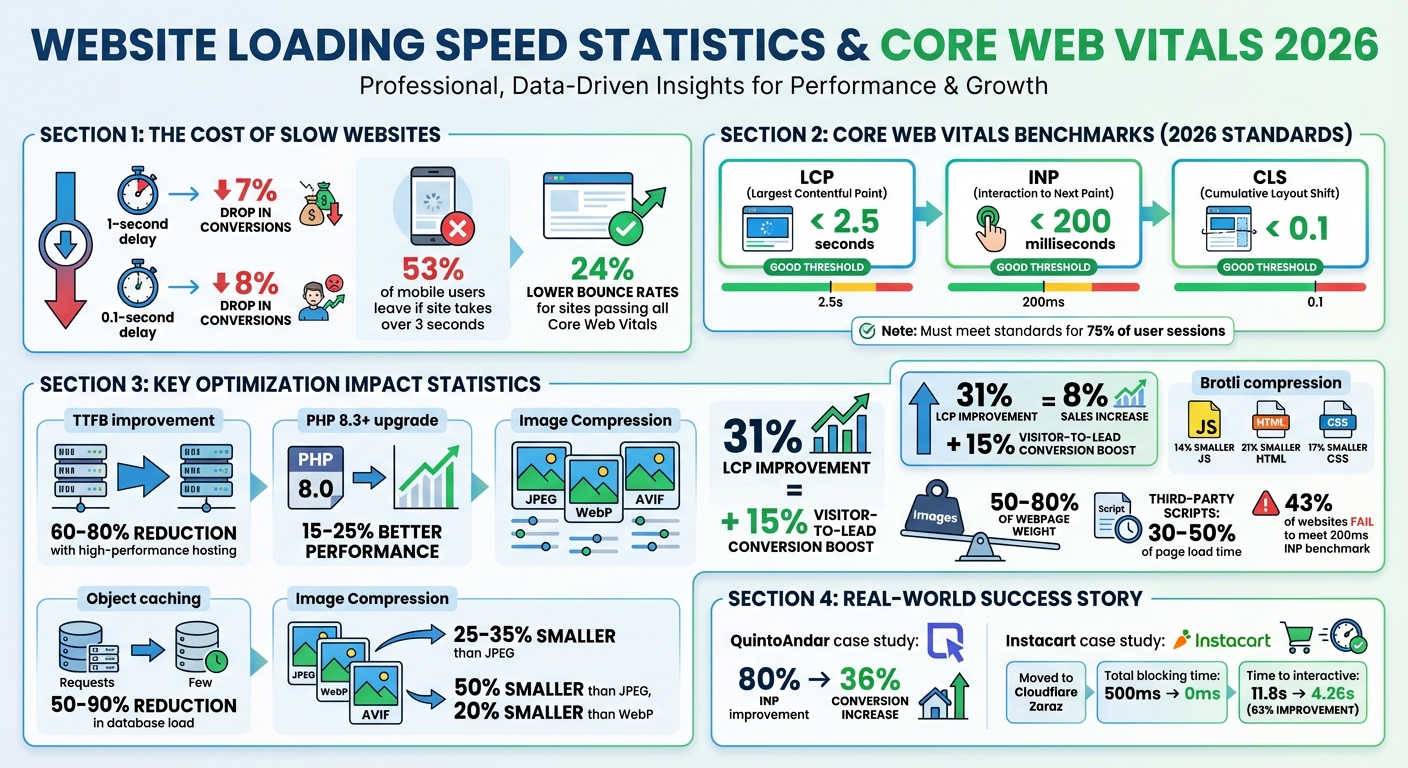
Website Speed Impact on Conversions and Core Web Vitals Benchmarks 2026
I Turbocharged My Site’s Page Speed Scores by Doing This
sbb-itb-d0c5e4d
Analyze Your Website's Current Performance with AI Tools
Before making changes to your website, it's essential to understand how it's currently performing. AI-powered tools are great for this - they process vast amounts of data to identify issues, explain their causes, and rank fixes based on their impact on your business. Start by using these tools to collect actionable insights about your site's performance.
Use AI-Driven Tools for Performance Data
A good starting point is Google PageSpeed Insights, which evaluates how real Canadian users interact with your site. This tool uses data from the Chrome User Experience Report (CrUX), offering insights based on actual visitor experiences rather than simulated conditions. Aim to meet Core Web Vitals benchmarks at the 75th percentile, ensuring your site performs well for most users.
For deeper analysis, export your Lighthouse report as a JSON file and use AI tools to differentiate between minor tweaks and major updates. AI-powered Real User Monitoring (RUM) tools like DebugBear (starting at $49/month) and Sentry (team plans from $26/month) are particularly helpful. These tools can group performance issues into clear insights. For instance, they might reveal that an INP (Interaction to Next Paint) problem only affects low-end Android devices, allowing you to focus your efforts where they matter most. Additionally, these tools can detect performance drops immediately after code changes and link them to specific commits, helping you refine your optimization strategy.
Test Performance Across Devices and Regions
Once you've gathered performance data, it's time to test your site across different devices and regions. For example, your site might load quickly on a desktop in Toronto but lag on mobile devices in rural Alberta. AI-powered RUM tools can segment data by device type and location, revealing bottlenecks in areas with slower network speeds.
Since Google prioritizes mobile Core Web Vitals for rankings, focus on mobile performance testing. By combining synthetic tests during development with RUM data, you can capture consistent metrics and real-world user experiences under various conditions. Addressing these device and regional variations ensures a smoother experience for all users and helps maintain strong search rankings.
Improve Hosting, Framework, and Infrastructure
Once you've pinpointed performance issues using AI tools, the next step is to fine-tune your hosting setup and infrastructure. These changes are essential for achieving long-term improvements in site speed.
Your hosting environment plays a key role in your site's performance. Choosing the right hosting and infrastructure is crucial to meet the high-performance benchmarks expected by 2026.
Select High-Performance Hosting
Choosing high-performance hosting can slash Time to First Byte (TTFB) by 60–80%, ensuring faster content delivery for visitors across Canada. Budget shared hosting might seem appealing, but it often leads to resource competition with other websites. If neighbouring sites experience traffic surges, your site's speed could suffer.
For WordPress users, upgrading to PHP 8.3+ can deliver substantial speed benefits. This version offers 15–25% better performance compared to PHP 8.0, thanks to enhanced JIT compilation. Pair this with object caching tools like Redis or Memcached, which shift database queries into memory. This can reduce database load by an impressive 50–90%. Look for hosting providers that support PHP 8.3+, include built-in object caching, and offer flexible edge caching options to consistently keep TTFB low.
While Google recommends a TTFB under 800 ms, top-performing sites in 2026 aim for speeds below 200 ms. If your audience spans Canada - from Vancouver to Halifax - edge caching is a game-changer. By storing your page HTML on servers closer to your users, edge caching can dramatically cut load times.
Use the Web3 Framework for Speed Improvements
After optimizing your hosting setup, the Web3 Framework can further enhance your site's performance. Designed specifically for WordPress, this framework offers SEO-friendly and speed-focused optimizations. It combines server-level caching with WordPress's architecture, ensuring faster load times without requiring deep technical expertise [website].
The Web3 Framework comes with pre-configured settings tailored to Canadian businesses, making it easier to meet the 2026 Core Web Vitals standards. At the same time, it maintains the flexibility and user-friendliness that WordPress is known for [website]. This balance of performance and functionality makes it a practical choice for businesses looking to improve user experience and search engine rankings.
Apply Advanced Media Optimization Methods
Images make up 50%-80% of a webpage's weight, which means optimizing them is one of the quickest ways to improve loading speed. By 2026, using modern image formats and efficient delivery techniques can significantly cut down file sizes.
Convert Images to WebP and AVIF Formats
In 2026, AVIF and WebP have become the go-to image formats. They offer advanced compression that slashes file sizes without sacrificing quality. For example, WebP can produce files that are 25%-35% smaller than JPEGs, while AVIF goes even further, reducing file sizes by up to 50% compared to JPEG and about 20% smaller than WebP.
Browser support is strong, with WebP compatible with 96%-98% of browsers and AVIF supported by 94%-97%. This compatibility, combined with performance benefits, makes these formats essential. A 31% improvement in Largest Contentful Paint (LCP) can lead to an 8% increase in sales and a 15% jump in visitor-to-lead conversions.
To implement these formats effectively, use the <picture> element to prioritize AVIF, followed by WebP, and fall back to JPEG if needed. Set compression quality between 75%-85% to balance file size and image clarity. Start with converting hero images to AVIF to enhance LCP scores. Additionally, strip unnecessary metadata like EXIF and GPS data during conversion to save extra bytes.
"Modern image optimization is no longer about 'compressing files.' It is about: Delivering the right image, in the right format, at the right resolution, at the right moment, to the right device, without harming Core Web Vitals or SEO." - Ask SEO Coach
Turn On Lazy Loading and Adaptive Delivery
Once you've converted your images, the next step is optimizing how they're delivered.
Lazy loading ensures images load only when they’re about to appear on the screen, cutting down initial load times. Use the native loading="lazy" attribute for images below the fold. For above-the-fold or LCP-critical images, use loading="eager" combined with fetchpriority="high" to make sure they load right away.
Define image dimensions using width, height, or aspect-ratio attributes to avoid layout shifts. Employ the srcset attribute with sizes to serve the best image resolution for each device. For animated content, switch to formats like MPEG4 or WebM, which can reduce file sizes by 5 to 10 times compared to GIFs.
Speed Up Loading with Code Optimization and Compression
After optimizing images, the next step is to streamline your code. JavaScript and CSS files often include extra whitespace, comments, and redundant code that can drag down your site’s performance. By minifying these files and applying Brotli compression, you can shrink transfer sizes by up to 60–80%, significantly improving loading times and overall performance. This step builds on earlier improvements, ensuring every element on your site loads quickly and efficiently.
Minify and Load CSS and JavaScript Asynchronously
Minification removes unnecessary elements like whitespace and comments from your code. This process can reduce JavaScript bundle sizes by 40–60% and CSS files by 30–50%, which translates to faster loading times. For example, mobile Time to Interactive can improve by as much as 1.2 seconds.
In 2026, many developers use a dual-tool approach: tools like esbuild for quick development builds and Terser for production minification. For CSS, tools like cssnano are popular for advanced optimizations. If you’re working with frameworks like Bootstrap or Tailwind, PurgeCSS can remove unused CSS selectors, cutting file sizes by 80–95%.
To further enhance performance, eliminate render-blocking resources. Add the defer attribute to script tags so browsers can download JavaScript while parsing HTML, but delay execution until the DOM is ready. For analytics scripts, the async attribute is a better choice. Inline critical above-the-fold CSS into the HTML <head> and lazy-load the rest using a pattern like this:
<link rel="stylesheet" href="..." media="print" onload="this.media='all'"> Also, avoid using CSS @import declarations, as they force sequential downloads that delay rendering. Once your code is minified, applying Brotli compression takes performance to the next level.
Use Brotli Compression and HTTP/3 Protocols
After minifying your code, compress it further with Brotli. This modern compression algorithm uses a 122KB static dictionary to achieve smaller file sizes than Gzip. On average, Brotli produces files that are 14% smaller for JavaScript, 21% smaller for HTML, and 17% smaller for CSS.
"Brotli performance is: 14% smaller than gzip for JavaScript, 21% smaller than gzip for HTML, 17% smaller than gzip for CSS." – Michael DiBlasio, web.dev
For static assets like CSS and JavaScript, use Brotli level 11 during the build process. For dynamic HTML, Brotli level 6 strikes a good balance between CPU usage and speed. Many CDNs, such as Cloudflare, make enabling Brotli as simple as flipping a switch. If you’re using Nginx, enabling brotli_static on; will allow you to serve pre-compressed files directly.
Pair Brotli with HTTP/3, which is based on the QUIC protocol. HTTP/3 eliminates head-of-line blocking and reduces connection setup time from 2–3 round trips to just one - or even zero for returning visitors. Together, Brotli and HTTP/3 ensure a fast, seamless experience for users. Most CDNs support these technologies, making them an easy and effective way to improve loading times.
Limit Third-Party Scripts and Prioritize Key Content
To improve site speed, focus on managing third-party scripts and ensuring key content loads quickly. A staggering 94% of websites rely on third-party scripts, which can account for 30% to 50% of page load time on modern sites. On average, websites include 30 to 40 of these scripts, and the most resource-intensive ones can block the main thread for up to 1.6 seconds on over half of analysed sites. By auditing these scripts and prioritizing essential content, you can significantly enhance loading speed and overall user experience.
Review and Remove Unnecessary Scripts
Start by identifying third-party scripts that are slowing your site. Tools like Lighthouse and Chrome DevTools can help pinpoint scripts that block the main thread for more than 250 milliseconds. Remove any scripts that provide little business value.
Regularly audit your Google Tag Manager container - ideally every quarter. Remove inactive tools like session replays, heatmaps, and chat widgets that unnecessarily consume resources. For example, Zendesk chat widgets can add 2.3 MB of unzipped JavaScript and heavily impact the main thread. Switching to lighter alternatives, such as Crisp (which adds only about 100 KB), can make a noticeable difference. Another approach is to replace heavy widgets with static triggers that only load scripts when users interact with them. For instance, YouTube embeds can block the main thread for 4.5 seconds on 10% of mobile sites; using a lightweight solution like lite-youtube-embed can resolve this issue.
For scripts that are essential, consider offloading them to a web worker with tools like Partytown to prevent competition with the main thread. Alternatively, switch to server-side tracking methods using tools like Cloudflare Zaraz or Facebook Conversions API. In 2024, Instacart moved its third-party tools to Cloudflare Zaraz, cutting total blocking time from 500 milliseconds to zero and improving time to interactive by 63% - from 11.8 seconds to just 4.26 seconds.
Once unnecessary scripts are addressed, shift your focus to ensuring critical content loads quickly.
Load Above-the-Fold Content First
After reducing third-party script overhead, it’s crucial to prioritize loading visible content immediately. Aim for the Largest Contentful Paint (LCP) element - such as a hero image or headline - to load within 2.5 seconds for at least 75% of visits. Avoid lazy-loading images above the fold; instead, preload critical assets using <link rel="preload"> and set fetchpriority="high". For example, Google Flights improved its LCP from 2.6 seconds to 1.9 seconds by assigning fetchpriority="high" to its LCP background image.
Preload key assets like fonts and hero images, and use resource hints (e.g., preconnect or dns-prefetch) to cut connection time by up to 400 milliseconds. Delay non-essential scripts, such as analytics or session replays, by setting triggers for "Window Loaded" or introducing a three-second delay.
Additionally, inline critical CSS directly in the <head> to eliminate network request delays for above-the-fold content. Use defer or async attributes for non-critical scripts to ensure they don’t block rendering. Prioritizing visible content while pushing less-critical resources to the background creates a quick, seamless experience that keeps users engaged.
Track and Maintain Performance with AI-Powered Solutions
Once you've implemented hosting, media, and code optimizations, keeping those improvements intact requires continuous monitoring. This is where AI tools come into play. Without ongoing oversight, even a 0.1-second delay can lower conversions by 8%. Plus, a staggering 43% of websites fail to meet the 200-millisecond Interaction to Next Paint (INP) benchmark. AI-powered monitoring ensures your performance remains consistent and competitive by catching issues before they spiral.
Use AI Tools for Automated Monitoring
AI monitoring tools go beyond just pointing out problems - they help you understand why they're happening and offer actionable solutions. For instance, modern Real User Monitoring (RUM) tools can spot anomalies in real time, flagging performance issues as they arise. This is essential since Google now prioritizes Field Data (real user experiences from the Chrome User Experience Report) over Lab Data, such as Lighthouse scores.
"Traditional monitoring reports events; AI-powered tools explain causes and suggest fixes."
- PageSpeedFix
To stay ahead, use the web-vitals library to track key metrics like INP and Largest Contentful Paint (LCP). Set alerts for when metrics approach Google's "Poor" thresholds, such as INP exceeding 160 milliseconds or LCP surpassing 2.0 seconds. Proactive alerts help you fix issues before they impact users. Tools like DebugBear (starting at $49/month for three sites) or Vercel Analytics (which offers a free tier) automate anomaly detection and can link performance spikes to specific code changes.
For added protection, integrate Lighthouse CI into your deployment pipeline. This ensures performance budgets are enforced, automatically halting builds that exceed limits like a JavaScript bundle size over 300 KB or an LCP above 2.0 seconds. By stopping regressions before they hit production, you can maintain Google's "Good" thresholds, which require at least 75% of user sessions to meet performance standards.
Run Regular Audits and Updates
Quarterly performance audits are essential to keeping up with evolving web standards. Break down your RUM data by device type, location, and traffic source to uncover issues affecting specific user groups, such as those on slower 3G networks. For example, QuintoAndar improved their INP by 80%, leading to a 36% boost in conversions.
Focus on the 75th percentile of page loads to meet Google's benchmarks. Websites that pass all three Core Web Vitals thresholds experience 24% lower bounce rates, making regular audits a direct driver of revenue. AI tools can also simplify complex performance analysis. Ask questions like, "What caused yesterday's checkout page slowdown?" and get instant, actionable insights.
Conclusion
Focusing on advanced strategies to boost website speed in 2026 isn't just a technical upgrade - it's a direct path to higher revenue. A delay as brief as one second can slash conversions by 7%, and even a 0.1-second slowdown could cause an 8% drop in conversions. The methods discussed here - like AI-powered monitoring, high-performance hosting, AVIF image formats, and tight control over third-party scripts - are essential for staying competitive in a world where Core Web Vitals can make or break your rankings.
Google now places greater importance on real user data rather than synthetic Lighthouse scores. Your site’s performance is assessed over a rolling 28-day window, using the 75th percentile of actual user sessions. This means the slowest 25% of sessions - often from older devices or slower networks - carry significant weight in determining your rankings. Meeting all three Core Web Vitals thresholds can reduce bounce rates by 24%, which has a direct impact on your bottom line.
"Performance optimisation is not a one‑time project - it is a continuous process."
- Digital Applied
Consistent improvements, no matter how small, can lead to long-term ranking stability. In the 2026 digital landscape, where AI tools dominate, slow websites risk being excluded from AI-generated summaries altogether, no matter how good the content is. To stay ahead, incorporate performance budgets into your CI/CD pipeline, monitor CrUX data weekly through Google Search Console, and conduct thorough audits every quarter to catch potential issues before they escalate.
The real question for 2026 isn’t whether you should invest in performance optimization - it’s whether you can afford not to. By combining AI-driven monitoring with cutting-edge infrastructure upgrades, you’ll ensure your site remains competitive and continues to thrive.
"The question for 2026 isn't whether you can afford to invest in performance optimisation. It's whether you can afford not to - while your competitors are compounding their advantage every day."
- N7.io
FAQs
What’s the fastest way to improve my LCP in 2026?
If you're looking to improve your LCP quickly, focus on streamlining critical assets and cutting down load times. Here are some effective strategies:
- Preload important images: Ensure key visuals load faster by preloading them, especially above-the-fold content.
- Use efficient image formats: Convert images to formats like WebP or AVIF, which offer better compression without losing quality.
- Inline critical CSS: Include essential CSS directly in your HTML to speed up rendering.
- Leverage server-side rendering (SSR): SSR can help deliver content faster by generating HTML on the server before sending it to the browser.
Additionally, AI-powered performance tools can be a game-changer. These tools can help pinpoint bottlenecks, minimize JavaScript execution time, and enhance server response times. The ultimate goal? Ensure your main content loads in 2.5 seconds or less.
How can I lower INP on slower mobile devices?
To improve Interaction to Next Paint (INP) on slower mobile devices, the goal is to make interactions smoother and reduce delays. Here are some practical ways to achieve this:
- Minimize third-party scripts: Too many external scripts can slow things down. Remove unnecessary ones and streamline the ones you need.
- Optimise event handlers: Ensure your event handlers are efficient and lightweight to avoid lag during interactions.
- Reduce layout shifts: Unexpected layout changes can disrupt the user experience. Keep elements stable to avoid these shifts.
Additionally, adopt responsive design to ensure your site adjusts well to different screen sizes, and preload critical resources so key elements load faster. These steps can make your site feel much quicker and more responsive, even on slower mobile devices.
Which third-party scripts should I remove first?
To improve your site's performance and Core Web Vitals, start by addressing third-party scripts that can slow down the critical rendering path. These include tools like analytics platforms, ad networks, social media widgets, and chat support plugins. Identify scripts that block the main thread, trigger layout shifts, or delay page loading. For non-essential scripts, consider deferring their execution until after the user interacts with the page. Use techniques like async or defer to optimize the loading of necessary scripts without compromising the user experience.
