When selecting a web design agency, your decision can directly impact your business success. A poorly chosen agency could lead to wasted budget, missed deadlines, and lost opportunities. To avoid these pitfalls, ask these 8 key questions:
- What experience do you have in our industry?
Look for agencies that understand your market but avoid those using cookie-cutter templates. Request case studies and client references to gauge their expertise. - What is your design and development process?
A clear, structured process ensures realistic timelines and fewer delays. Confirm their workflow includes discovery, wireframing, testing, and post-launch support. - How do you handle SEO and website performance?
SEO and performance should be integrated from the start. Ask about their strategies for page speed, mobile-first design, and technical SEO. - What does your portfolio show about your capabilities?
Go beyond visuals - check for measurable outcomes and accessibility compliance. Ensure they don’t rely solely on templates. - How do you ensure accessibility compliance?
Verify they follow WCAG 2.0/2.1 standards, test with tools and manual audits, and prioritize features like alt text, keyboard navigation, and proper colour contrast. - What are your communication and project management practices?
Strong communication prevents delays. Confirm they use project management tools and provide a single point of contact. - Can you share references and case studies?
Speak to past clients about their experience, especially how the agency handled challenges. Review case studies for clear results and problem-solving approaches. - Does your pricing fit our budget and project scope?
Request transparent, itemized quotes. Understand their pricing model (hourly, flat fee, retainer, or value-based) and watch for hidden costs like maintenance or content creation.
Choosing the right agency involves thorough research and asking the right questions. This approach ensures you get a website that aligns with your business goals, performs well, and avoids costly mistakes.
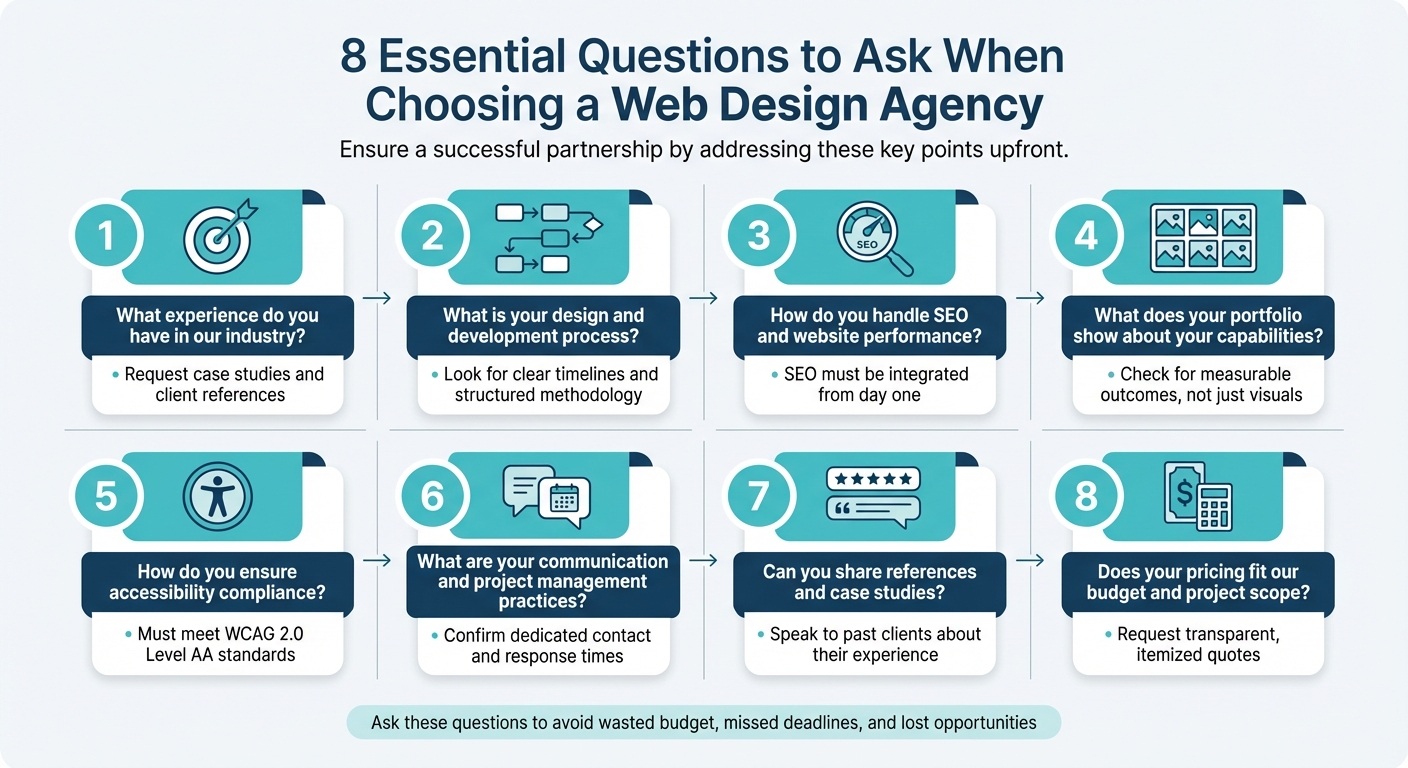
8 Essential Questions to Ask When Choosing a Web Design Agency
How to Find a Web Design Agency | 5 Things to Consider
sbb-itb-d0c5e4d
1. What Experience Do You Have in Our Industry?
Having industry-specific experience isn’t just helpful - it’s what separates an agency that truly understands your business from one that treats your project like just another website build. Agencies with this kind of knowledge already get your audience’s needs, industry jargon, and any compliance standards your business must follow. This means they can focus on solving your unique challenges instead of spending time learning the basics.
However, too much specialisation can sometimes lead to cookie-cutter solutions. As Rodney Warner, Founder & CEO of Connective Web Design, points out:
Industry specialisation frequently means the agency has a playbook they're going to run regardless of your specific situation... What you actually want is an agency that's expert at extraction and translation.
If you notice that an agency’s portfolio is filled with nearly identical websites, it may be a sign they rely on templates rather than crafting tailored solutions. What really matters is their ability to research your market, identify what makes your business stand out, and create a web strategy that delivers results - not just following a pre-set formula.
How to Evaluate Industry Knowledge
To assess an agency’s expertise, start by reviewing their portfolio and case studies. A portfolio can give you an idea of their design style, while case studies show whether they can deliver measurable results. Thought Media sums it up well:
A portfolio showcases the ability of the agency to make things look nice, while a case study demonstrates the ability to make things work.
Don’t just skim through screenshots - request a project walkthrough. Ask the agency to explain the challenges they faced, the goals they were aiming for, and the results they achieved. Also, make sure their knowledge is up-to-date by asking for client references from the past 6–12 months.
If the agency hasn’t worked in your industry before, dig into their research process. How do they plan to learn about your market? What steps do they take before diving into design? Often, an agency’s ability to ask smart questions and adapt to new industries is more valuable than having an existing playbook.
Questions to Ask About Their Experience
To uncover whether an agency truly understands your industry - or if they’re just reusing generic templates - ask these questions:
- "Can you walk us through a relevant case study end-to-end, including the business goals and results?" This helps you gauge their strategic thinking, not just their design skills.
- "What did you learn in discovery for your last client that significantly shaped the final design?" This shows how deeply they engage with each client’s specific needs.
- "What unique insights did you discover about our market?" For agencies claiming to be industry specialists, this question reveals whether they’ve gone beyond surface-level knowledge.
- "Can you provide references from clients in a similar industry or with similar project goals?" Real client feedback can confirm their claims.
- "Is there anything in our RFP you would do differently based on your experience in this sector? Why?" This tests whether they’re critically thinking about your project or just following a standard process.
Lastly, if an agency is pitching their own proprietary CMS, be cautious. Unless they’re a dedicated CMS company, their platform likely won’t offer the long-term support or updates that established platforms provide. Look for an agency that’s technology agnostic - one that recommends tools based on your specific needs, not their own agenda.
2. What Is Your Design and Development Process?
Having a clear and structured process can save you from delays, budget overruns, and endless revisions. When an agency explains their workflow in detail, it shows they’ve honed their methods through experience and can set realistic expectations. Between 35% and 66% of web projects fail because of poor communication or mismatched expectations. Plus, 50% of website redesigns miss their original launch date. Knowing how an agency operates can help you avoid becoming part of these statistics.
Most agencies follow a fairly standard process that includes stages like Discovery/Strategy, Planning (Sitemaps/Wireframes), UI/UX Design, Development, Content Integration/SEO, Testing/QA, and Launch/Support. The discovery phase, which typically takes 4–6 weeks, involves activities like stakeholder interviews, competitor analysis, and creating user personas to align the project with your business goals. Before diving into visual design, agencies usually create wireframes and sitemaps. These low-fidelity layouts map out your site’s structure and user journey, helping to avoid costly changes later.
A good agency will share early prototypes and keep you updated regularly, allowing for 2–3 revision rounds per deliverable. Projects tend to move 30–40% faster when clients are actively engaged and provide timely feedback. Agencies often rely on tools like Jira, Trello, or Asana to track progress and maintain transparency.
What a Clear Process Should Include
A well-defined workflow should outline timelines, milestones, and approval points at every stage. For example, a standard services-based website (5–8 pages) generally takes 6–8 weeks, while larger sites (15+ pages) may require 8–12 weeks. Truly custom builds in 2026 often take 14 to 20 weeks, as they require more tailored solutions rather than relying on templates. Make sure the agency can provide a documented version of their process - this demonstrates professionalism and helps minimize project risks.
Key sign-off points should occur after wireframes and design mockups, reducing the likelihood of expensive changes during development. Look for agencies that use a staging environment - a private testing site where you can preview a fully functional version before it goes live. It’s also important to clarify what counts as a "revision round" (consolidated feedback) versus a "change order" (new features or scope adjustments). This distinction helps avoid scope creep and keeps costs predictable.
Ask for a detailed project timeline broken down by phase. Here’s an example of what that might look like:
| Phase | Typical Duration | Key Activities |
|---|---|---|
| Discovery & Strategy | 1–2 Weeks | Stakeholder interviews, competitor audits, goal setting |
| UX Wireframing | 2–3 Weeks | Sitemap creation, low-fidelity blueprints, user flow |
| Visual UI Design | 2–4 Weeks | High-fidelity mockups, branding, mood boards |
| Development | 4–8 Weeks | Front-end/back-end coding, CMS integration, AI setup |
| Testing & QA | 1–2 Weeks | Cross-browser testing, speed checks, accessibility audits |
A thorough process should also include a "snag list" period - usually about 30 days after launch - for fixing minor issues. Additionally, the agency should provide training so your team can manage the CMS independently. Weekly check-ins and live demos are essential to keep the project on track and identify risks early.
Warning Signs in Agency Workflows
Even with a structured process, some red flags indicate potential problems. Be wary of agencies that promise to start design within two weeks - this often means they’re skipping the critical discovery phase. As Rodney Warner, Founder & CEO of Connective Web Design, explains:
Agencies that shortcut discovery are guessing. They're gambling your budget on their intuition rather than your customer's reality.
Other warning signs include vague timelines, a lack of documented methodology, or excessive use of jargon to cover up gaps in their process. If an agency offers "unlimited revisions", it may lead to inflated pricing or tension later, as there’s no clear boundary between regular feedback and scope changes.
Watch out for phrases like "we’re flexible" instead of a clear framework - this often signals a lack of structure, which can derail a project. Another red flag is when senior staff present during the pitch disappear after the contract is signed, leaving your project in the hands of less experienced team members. Always ask, "Will the team I’m meeting today be the same team working on my project?"
Agencies that rely heavily on templates may promise faster timelines (under 4 weeks), but they often skip essential steps like discovery and UX wireframing, which are critical for creating high-performing custom websites.
3. How Do You Handle SEO and Website Performance?
A website's success isn't just about how it looks or functions - it also depends on how easily it can be discovered and how well it performs. Once the design and development process is solid, integrating SEO and performance considerations becomes critical.
SEO and performance shouldn't be an afterthought; they need to be part of the website strategy from day one. If an agency overlooks SEO early on, you could end up with a site that search engines struggle to index properly. In contrast, when SEO is embedded from the start, it can lead to impressive results, such as a 200% boost in organic traffic.
Performance and user experience are closely tied. With over 60% of global searches happening on mobile devices, and Google prioritizing the mobile version of your site for crawling and indexing, a mobile-first design approach is essential. This means designing for smaller screens first and scaling up. Beyond design, search engines evaluate user engagement metrics like dwell time and bounce rate as signals of quality.
How to Assess SEO Knowledge
A reliable agency should be able to explain how SEO is integrated into every phase of their process - not just during content creation. Ask them about their technical approach, including:
- How they structure URLs and headings (H1–H4).
- Whether they use absolute paths instead of relative ones.
- Their use of Schema.org markup (JSON-LD) to help search engines understand the context of your content and unlock features like FAQ snippets.
During discovery calls, ensure designers are involved to directly capture customer insights. If they can't articulate customer pain points identified during research, it could indicate the agency works in silos. Also, ask about their process for avoiding keyword cannibalization, which happens when multiple pages compete for the same search terms. Another good question is how they ensure key pages are accessible within 2–3 clicks from the homepage.
Performance Metrics That Matter
Once SEO strategies are set, tracking key performance metrics is essential to confirm their success.
Google's Core Web Vitals are now critical for rankings. These include:
- Largest Contentful Paint (LCP): Should be ≤ 2.5 seconds.
- First Input Delay (FID): Should be ≤ 100 milliseconds.
- Cumulative Layout Shift (CLS): Should be ≤ 0.1.
These metrics measure how quickly your site loads, how responsive it is, and how stable the layout feels during loading.
Ask agencies which tools they use to monitor these metrics. Reputable firms often rely on tools like Google PageSpeed Insights or GTmetrix to identify performance issues. For technical SEO audits, they might use platforms like SEMrush, Ahrefs, or Screaming Frog. They should also optimize images by keeping file sizes under 55 kb - preferably in WebP format - and use lazy loading for images that aren't immediately visible.
Request case studies to see their results. For example, one agency improved a medical negligence firm's organic traffic by 45% through integrated SEO and web design. Another achieved an 84% year-over-year increase in organic traffic for a solar energy company. These examples demonstrate the tangible benefits of combining SEO with strong performance practices.
4. What Does Your Portfolio Show About Your Capabilities?
An agency's portfolio is like a window into their process - it reveals how they approach challenges, solve problems, and deliver results. But don’t just focus on the visuals. Dig deeper to see if their work aligns with your goals and whether they can deliver measurable outcomes.
"A strong portfolio goes beyond good-looking pages. It demonstrates how a team thinks, solves problems, and turns business goals into websites that attract and work for real users." – Dribbble
Start with their own website. How fast does it load? Is it mobile-friendly? Is the messaging clear? If their site feels clunky or poorly optimized, it could be a warning sign for what to expect from your own project. A portfolio packed with well-executed projects speaks volumes about an agency’s ability to translate business goals into effective design.
Reviewing Design and User Experience
Take time to test live examples from their portfolio. Look at how these sites perform on both mobile and desktop. Pay attention to factors like load times, navigation, messaging, and content structure. Mobile responsiveness is especially important in today’s web environment.
Ask the agency to walk you through a specific project. How did they handle challenges? What were the key decisions they made, and how did those decisions impact the results? If they can’t explain the reasoning behind their choices or connect their work to tangible business outcomes, consider it a red flag.
Another critical element is accessibility. Check if their portfolio demonstrates adherence to standards like WCAG 2.1 or AODA, which ensure websites are usable for individuals with visual or hearing impairments. Also, confirm that their designs are custom-built rather than based on pre-made templates. Templates may seem convenient, but they can limit flexibility and performance down the road.
Finally, look for a portfolio that showcases projects across different industries, as this can highlight the agency’s ability to solve a variety of business challenges.
Checking for Diverse Project Experience
An agency with experience across multiple industries - like e-commerce, SaaS, healthcare, or local businesses - shows they can adapt to different needs. This adaptability often means they take the time to understand what makes each business unique rather than applying cookie-cutter solutions.
Dive into their case studies. Strong ones will clearly outline the project’s goal, the agency’s role, the strategy they used, and the results they achieved. For example, Forge and Smith redesigned Spur Communication’s website, leading to a 40.5% increase in organic search traffic within just one month of launch.
Look for portfolios that balance creativity with performance. It’s not just about making a site look good - it’s about creating something that drives business results. As AI tools simplify basic design tasks, agencies that focus on strategic, performance-driven websites will stand out in 2026.
"The prettiest portfolio doesn't guarantee the best partnership. Agencies often showcase their best 5% of work, and the team that built those showcase projects may no longer be there." – Jocelyn Lecamus, CEO, Utsubo
Finally, check if the agency mentions ongoing maintenance and support. Websites need regular updates to stay secure and perform well in search engines. If this isn’t mentioned in their portfolio or description, don’t hesitate to ask about it directly.
Keep these tips in mind as you evaluate each agency’s portfolio alongside their communication and project management skills.
5. How Do You Ensure Accessibility Compliance?
In Canada, accessibility isn't just a good practice - it's the law. Provincial regulations like Ontario's Accessibility for Ontarians with Disabilities Act (AODA) require websites to meet WCAG 2.0 Level AA standards to ensure digital spaces are inclusive for people with disabilities, including those with visual, hearing, cognitive, or motor impairments. When selecting an agency, it's crucial to confirm they understand these legal requirements and can design websites that prioritize accessibility alongside user experience and SEO.
"Understanding WCAG guidelines is not about checking boxes, it's about building inclusive digital experiences that benefit all users." – Accessibility Partners
An accessible website adheres to the POUR principles: content must be Perceivable (users can see or hear it), Operable (usable via keyboard), Understandable (predictable and consistent), and Robust (compatible with assistive technologies). Ask agencies how they integrate these principles from the beginning of a project. The industry is shifting from treating accessibility as a checklist to embedding inclusive design into every stage of development. Just like strong SEO and design practices, accessibility plays a critical role in a website's overall performance.
Accessibility Features to Expect
A truly accessible website incorporates several key features, including:
- Colour Contrast: Text should meet a contrast ratio of 4.5:1 for normal text and 3:1 for larger text to ensure readability.
- Keyboard Navigation: The site must be fully navigable using a keyboard, with visible focus indicators and "skip-to-content" links to help users bypass repetitive menus.
- Alt Text for Images: Every image should include meaningful alternative text to describe its purpose or context for screen reader users.
- Multimedia Accessibility: Videos and audio content should include captions and transcripts, and the site should allow text to be resized up to 200% without breaking the layout.
- Semantic HTML and ARIA: Proper use of headings (H1, H2, H3) and ARIA labels ensures assistive technologies like JAWS, NVDA, and VoiceOver can interpret the page structure accurately.
- Mobile Accessibility: With WCAG 2.1 adding criteria like touch target spacing and zoom controls, agencies should ensure mobile users' needs are addressed.
These features are essential for creating an inclusive and seamless experience for all users.
Questions to Ask About Accessibility
Start by asking, "What WCAG level do you target, and how do you validate compliance?". Agencies should meet at least WCAG 2.0 Level AA (the legal standard) and ideally aim for WCAG 2.1 Level AA, which includes enhancements for mobile users.
It's also important to understand their testing process. Automated tools like WAVE, Axe, and Lighthouse can quickly identify issues like missing alt text or poor contrast. However, these tools have limitations.
"Automated accessibility testing software can help identify accessibility issues quickly and efficiently... However, an automated test is only a start. Once you've completed a computerized test, use a manual test to check the software's edits and check for anything it may have missed." – Amit Aggarwal, Accessibility Partners
The best agencies go beyond automated scans by conducting manual audits. Experts use screen readers and keyboard-only navigation to uncover barriers that automated tools might miss. They also involve real-world user testing, working with individuals who have disabilities to identify practical challenges.
"Technical compliance is however just one of the solutions. Nothing can substitute the real-world accessibility user testing in better UX where disabled individuals use your site to identify the practical obstacles that automated testing may overlook." – Inclusive Web
Ask specific questions like, "Do you test with actual screen readers, or do you rely solely on automated tools?" and "How do you ensure keyboard navigation works across the site?" If the agency can't provide clear answers, it may signal a lack of expertise.
Lastly, ensure the agency offers ongoing accessibility maintenance, as standards and technologies evolve, requiring regular updates to remain compliant.
6. What Are Your Communication and Project Management Practices?
Strong communication and effective project management are essential for keeping your project on track. Poor communication or disorganized project tracking can lead to delays, budget overruns, and unnecessary confusion. Before committing to an agency, it's crucial to understand how they plan to keep you informed and manage progress throughout the project.
"The success of a web design project is often determined by the quality of communication." – Clevr Solutions
A reliable agency should provide you with a dedicated point of contact or project manager. This ensures streamlined communication and avoids the pitfalls of uncoordinated updates from multiple team members, which can lead to errors and slowdowns. For example, Thrive Design stands out by promising a 20-minute email response time, far quicker than the usual 24–48 hours.
Top-performing agencies also emphasize transparency by sharing early prototypes and building in stages. This method keeps you involved and allows for timely feedback, reducing the risk of surprises when the final product is delivered. Regular updates - such as weekly meetings or scheduled reviews - help maintain alignment. Additionally, a clear process for handling scope changes is essential. This includes documenting new requests, estimating their impact on time and budget, and obtaining written approval to move forward.
When evaluating potential agencies, take the time to understand how their communication and project management strategies will foster collaboration and keep your project on track.
How to Assess Communication Standards
Start by observing how the agency communicates during the initial sales discussions. If responses are slow or unclear before you’ve signed a contract, it’s unlikely their communication will improve once the project begins. Ask direct questions like, “What’s your typical response time for emails?” or “How often will we have scheduled check-ins?” For agencies in different time zones, confirm that their working hours overlap enough to allow for real-time interactions.
It's also a good idea to speak directly with a developer or designer instead of only interacting with sales staff. This ensures the technical team is actively involved and reduces the chance of miscommunication, often referred to as the “broken telephone” effect.
Additionally, inquire about how they handle unexpected challenges and their risk management protocols. As an example, Convergine has completed over 300 projects while maintaining a 95% client retention rate by implementing clear strategies to address risks and unforeseen issues.
Project Management Tools They Use
Beyond communication, the tools an agency uses for project management play a big role in keeping you informed and engaged. Reputable agencies rely on dedicated software to maintain transparency and organization. Common tools include Asana, Trello, Basecamp, Monday.com, Slack, and ClickUp.
Ask questions like, “What project management tools do you use, and will I have access to the project dashboard?” Having access to a dashboard or client portal is critical for staying informed. These tools let you track progress, provide feedback, and manage invoices in one convenient place. For instance, Agency Handy offers a client portal with Kanban boards and file feedback features, earning high praise on platforms like G2 and Product Hunt. Other agencies might use Notion for flexible real-time collaboration or Wrike for advanced tracking with Gantt charts and custom dashboards.
If an agency can’t clearly explain their project management tools or refuses to grant you access to the dashboard, consider it a red flag. Transparency is key to avoiding a “black box” situation where you’re left in the dark until it’s too late to make adjustments.
7. Can You Share References and Case Studies?
References and case studies are essential for assessing an agency's ability to deliver results. A trustworthy agency should have no problem sharing client contacts and detailed case studies that outline their work.
When reviewing an agency, ask for contact details for at least 80% of their recent clients. Speak with a variety of clients: one who had an ideal project, one who has been a long-term partner, and one who experienced challenges during their project. That last conversation can be especially telling. Rodney Warner, Founder & CEO of Connective Web Design, puts it bluntly:
All our projects go well' is a lie. Every agency has difficult projects. The question is whether they learn from them and maintain relationships through challenges.
Case studies should outline the business challenges, constraints, strategies, and measurable outcomes. For instance, Bush Marketing worked with Edmonds Professional Corporation (EPC), a boutique accounting firm in Toronto, to redesign their website and implement an SEO strategy. This led to a 500% increase in leads and a 400% boost in profit per client. Ian Edmonds, EPC’s owner, shared:
The ROI from Bush Marketing's solution was extremely impressive. We immediately saw a spike in online traffic and lead conversions. The project was an overwhelming success.
Strong case studies should also highlight the problem-solving process, including challenges like budget or technical constraints, and the strategies used to overcome them. Ask the agency to walk you through a case study, focusing on what they advised the client not to do - this reveals their strategic thinking. Also, confirm whether the team members who delivered those results are still with the agency.
To supplement your research, check third-party reviews on platforms like Clutch, Google Reviews, or LinkedIn. When speaking with references, ask about cost transparency, communication during tough moments, and whether the agency offered ongoing support after launch. Additionally, request data on their "project reality" - such as the percentage of recent projects that were completed on time and within budget. This will provide a clearer picture of their reliability beyond the polished success stories.
How to Check References
When validating an agency’s claims, look for references that reflect a range of project experiences.
Ask for a list of clients from industries or projects similar to yours. This ensures the agency understands the unique challenges of your business, whether it’s seasonal demand, regulatory requirements, or niche competition.
Focus your questions on communication and transparency. Was the agency upfront about costs and timelines? Did they respond quickly to issues? Find out if the client had a dedicated point of contact or if they were shuffled between team members. Also, ask about post-launch support - does the agency continue to provide updates and strategy adjustments after the project goes live?.
Inquire about projects that faced challenges and how they were resolved. This will reveal how the agency handles pressure and whether they take responsibility for problems or shift blame. Be cautious if a reference seems overly rehearsed or avoids discussing negatives - it could be a red flag.
Lastly, check if the agency can adapt their workflow to fit your business needs. For example, if you operate a seasonal business, can they frontload work during your off-season? Flexibility can make a big difference.
How to Read Case Studies
Case studies offer a deeper look into how an agency approaches problem-solving and delivers results.
A solid case study should clearly explain the business problem, the constraints (like budget or deadlines), and the strategies used to address them. Be wary of case studies that only showcase design work without discussing business goals or measurable results. As The Clevr Solutions Team cautions:
A portfolio of beautiful but strategically empty websites is a sign of a design-first, business-second agency.
Look for case studies with specific metrics, such as increases in sales, lead generation, conversion rates, or traffic. For example, some agencies report outcomes like a 45% boost in organic traffic for niche firms or an 84% year-over-year increase for energy clients. Vague claims like "improved user experience" without data to back it up should raise concerns. John Crenshaw, Founder of UFO Rocks, highlights this point:
A website is not just about having an online presence with a site that looks good. It's about getting a return on investment and having that website deliver business results.
Examine whether the case study includes data-driven decisions. Do they mention customer research, heatmaps, or conversion optimization?. Case studies that dive into discovery processes show the agency bases decisions on actual user behaviour rather than guesswork. Also, check for technical depth - do they discuss performance tuning, accessibility, or mobile optimization? If a case study only includes static screenshots without live links to the final product, consider it a warning sign.
Pay attention to how the agency handles timelines and budgets. A mature agency will acknowledge when projects didn’t go perfectly and explain how they managed those challenges. Ask for details about how the original and final timelines and budgets compared. Be sceptical of claims of flawless delivery across all projects - it’s unrealistic given that 35% to 66% of web projects face significant issues, and half of redesigns miss their deadlines.
Finally, confirm whether the designers and developers behind successful case studies are still part of the agency. This ensures continuity. Look for evidence of ongoing support - does the case study mention post-launch monitoring, updates, or further optimization? Agencies that focus only on launch day without considering long-term growth may not be the right fit for your needs.
8. Does Your Pricing Fit Our Budget and Project Scope?
Transparent pricing is just as important as clear communication when it comes to ensuring your project's success. Without it, you risk unexpected costs that could derail your budget. A trustworthy agency should provide a detailed cost breakdown and clearly explain what’s included in their quote.
When evaluating quotes, ask for an itemized list that covers essentials like wireframes, UI/UX design, mobile responsiveness, basic SEO, testing, and launch support. Check if the price includes extras like content creation, stock images, or third-party integrations such as CRM connections. If these aren't listed, they might come with additional charges. Also, confirm how many revision rounds are included in the cost.
Unexpected costs can quickly inflate your budget by 50% or more. Common extras include domain registration, premium plugin licences (CAD $50–CAD $200 each), professional copywriting (CAD $50–CAD $500 per page), and email hosting services like Google Workspace (CAD $5–CAD $30 per user monthly). Rebecca Person, a web designer, highlights the risks of neglecting security:
The average cost to recover from a hacked website? Between $1,000 and $10,000.
To avoid surprises, ask for a "Not Included" list that specifies items excluded from the quote, such as hosting, SSL certificates, or ongoing maintenance. It’s also smart to set aside 15–20% of your budget as a contingency for unanticipated expenses.
Different Pricing Models Explained
Agencies typically use one of four pricing models, each suited to different project needs. Here's a breakdown:
- Hourly rates: These offer flexibility but can lead to budget overruns if not closely monitored. Rates vary widely - agencies in the U.S. charge CAD $100–CAD $250 per hour, while those in India charge CAD $15–CAD $35 per hour. Choosing agencies in lower-cost regions like South Asia or Eastern Europe can reduce expenses by 50–70%, but you'll need to carefully assess their quality and communication.
- Fixed or flat fees: Best for projects with clear requirements, this model provides a predictable budget. For instance, Seahawk Media offers custom WordPress packages starting at CAD $999, while Design Monks has tiered packages starting at CAD $1,850 for basic designs and CAD $3,950 for advanced features and maintenance. However, any changes to the project scope may require contract adjustments, adding costs and delays.
- Retainers: These monthly fees cover ongoing support like security monitoring and content updates. Eleken, for example, provides a dedicated designer for a fixed monthly fee. Retainers typically range from CAD $50 to CAD $300 monthly. While ideal for long-term needs, they can be expensive if your workload is light.
- Value-based pricing: This model ties costs to the potential business impact, such as revenue growth from an e-commerce redesign. It's often used for enterprise projects exceeding CAD $30,000 to CAD $100,000+. While it aligns agency goals with your ROI, estimating returns upfront can be tricky.
| Pricing Model | Best For | Pros | Cons |
|---|---|---|---|
| Hourly Rate | Small or undefined projects | Flexible; pay for hours worked | Hard to predict final cost |
| Fixed/Flat Fee | Clear project scopes | Predictable budget | Changes require contract revisions |
| Retainer | Ongoing support | Consistent support | Costly if workload is low |
| Value-Based | High-impact goals | Aligns costs with ROI | Difficult to quantify ROI upfront |
For large or uncertain projects, consider starting with a Minimum Viable Product (MVP) to test the idea and agency partnership before committing to a full-scale budget. Jon Hobbs-Smith, a consultant, suggests beginning with a discovery phase:
Somebody below suggested hiring a good agency to do a discovery project to help you write the specs and decide on a scope for the project. This is great advice!
A paid discovery phase helps define a clear Statement of Work (SOW), outlining inclusions like the number of pages and features. This prevents scope creep - the gradual expansion of a project beyond its original plan - which CQ Business Management Software warns is a major profitability killer:
Scope creep is the silent killer of web design project profitability.
How to Spot Hidden Costs
Even with a clear pricing model, hidden costs can sneak in if the project scope or inclusions aren’t well-defined. To avoid surprises, establish a formal change management process where any out-of-scope requests are documented and approved before work begins. iCreationsLAB emphasizes this point:
If a feature is not explicitly listed in the SOW, it is not included in the budget.
Post-launch support is a frequent hidden cost. Clarify whether ongoing maintenance, security updates, and hosting are included in the initial price or require a separate retainer. Maintenance plans typically cost CAD $50–CAD $300 monthly. Also, confirm who owns and pays for recurring plugin or font licences to avoid unexpected legal or financial issues.
Content services can also lead to extra charges. Agencies might design the website but leave content creation to you. Manual content migration alone can take 10–40 hours of billable time, and professional copywriting can cost CAD $50–CAD $500 per page. Ask upfront if these services are included.
Technical integrations, like connecting to legacy systems or high-usage APIs (e.g., Google Maps), may add extra costs or subscription fees. Compliance with standards like ADA/WCAG or GDPR should also be built into the project from the start, as retrofitting compliance later is far more expensive.
Design Monks underscores the importance of clarity:
Transparency builds trust. Clear structures reduce stress and set expectations.
Lastly, think about scalability. Basic hosting plans, often around CAD $10 monthly, may fail under high-traffic conditions, leading to emergency upgrades. Choose a hosting plan that can grow with your business and budget at least 25% of the total build cost for post-launch marketing and SEO in the first year.
Audit third-party licences and confirm if browser compatibility testing across major platforms (Chrome, Safari, Edge) is included in the SOW. Fixing display issues after launch can become a costly oversight. By asking the right questions and insisting on transparency, you can sidestep the financial pitfalls that derail many web design projects.
Conclusion
Selecting the right web design agency involves asking eight essential questions and ensuring their answers align with your business objectives. Begin by verifying the agency’s experience in your industry and their structured approach to projects. Look into their SEO expertise, evaluate their portfolio for diverse skills, and confirm their commitment to accessibility compliance. Additionally, assess their communication style, request references or case studies, and ensure their pricing structure is transparent and fits your budget.
When reviewing proposals, check for SMART goals - Specific, Measurable, Achievable, Relevant, and Timebound - that align with your goals, whether it’s boosting conversions or enhancing brand visibility. Ensure the proposal includes a detailed cost breakdown for each project phase, realistic timelines with contingency plans for delays, and clearly defined deliverables tailored to your needs. This approach ensures clarity and aligns with the detailed pricing insights discussed earlier.
Briony Perkins, SEO and Content Manager at Yellowball, underscores the importance of a solid foundation:
The first step in any web design project is to define your website's purpose and goals.
These financial and strategic details should connect seamlessly with your broader vision. To avoid setbacks, prioritize agencies with clear processes, ongoing support, and transparent communication. A discovery meeting is crucial to confirm your brand identity and functional needs before the design phase begins. Also, ensure a dedicated project manager is in place to keep things on track. Jonathan Cook, Founder and Developer at N4 Studio, highlights the value of transparency:
A good web agency will make sure you understand exactly how they operate and keep you involved along every step of the process.
Before signing, verify ownership rights, post-launch support availability, and any limits on revisions. Request a CMS demo to ensure your team can manage content updates independently; slow response times during this stage could signal future issues. Keep in mind that 75% of users judge a company’s credibility based on its website design, and 94% of users distrust or reject poorly designed or outdated websites. The right agency will focus on achieving your business goals, not just delivering an attractive homepage.
FAQs
What deliverables should be in a web design agency’s proposal?
When a web design agency presents a proposal, it needs to clearly define the project scope and lay out the key deliverables. These typically include wireframes, mockups, and the final website files. The proposal should also break down timelines and milestones, along with a list of services like responsive design, content management systems (CMS), SEO optimization, and testing procedures. This level of detail helps ensure everyone involved is on the same page and avoids any misunderstandings down the line.
Who owns the website files, content, and licences after launch?
When it comes to website files, content, and licences, ownership often hinges on the details of the contract. If the client or their team produced the content and the contract specifically states they own it, then ownership typically rests with them. However, in cases where the agency or developer created the content, they may retain the rights unless the contract explicitly transfers ownership to the client. It's critical to carefully examine all agreements to ensure the terms of ownership are clearly outlined before moving forward.
What ongoing support and maintenance should we budget for?
When planning your website budget, make sure to account for ongoing support and maintenance. This is essential to keep your site secure, running smoothly, and up to date. Regular expenses might include updates, security patches, hosting, backups, and technical assistance. It's a good idea to ask agencies about their maintenance packages and the specific services they offer. Align your budget with your needs - whether that's routine updates, fixing technical issues, or managing content - to ensure your website continues to support your business as it grows and changes.
